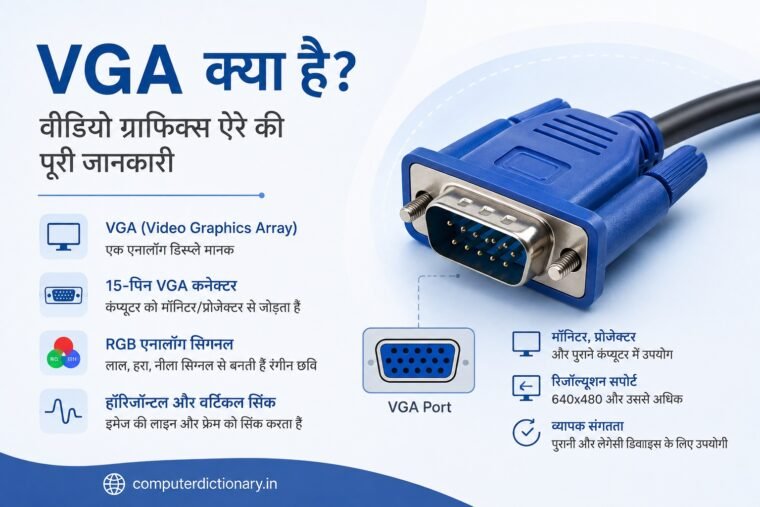
कंप्यूटर को Monitor, Projector या अन्य Display Device से जोड़ने के लिए अलग-अलग प्रकार के video interfaces और connectors का उपयोग किया जाता है। आज HDMI, DisplayPort और USB-C जैसे आधुनिक interfaces काफी लोकप्रिय हैं, लेकिन computer technology के विकास में एक समय VGA सबसे महत्वपूर्ण display technologies में से एक था।
पुराने Desktop Computers, CRT Monitors, LCD Monitors, Projectors, school और office computers तथा कई industrial systems में आपने नीले रंग का 15-pin connector जरूर देखा होगा। इसे सामान्यतः VGA Port कहा जाता है।
लेकिन आखिर VGA क्या है? VGA का Full Form क्या है? VGA Cable कैसे काम करती है और VGA तथा HDMI में क्या अंतर है?
VGA का संबंध computer से display device तक video information पहुंचाने से है। यह मुख्य रूप से analog video signals का उपयोग करता है और दशकों तक personal computers की display connectivity का महत्वपूर्ण हिस्सा रहा।
इस लेख में हम आसान हिंदी में VGA की definition, इतिहास, VGA Port, 15-pin connector, RGB signals, VGA Cable, advantages, limitations और HDMI जैसे modern interfaces से इसके अंतर को विस्तार से समझेंगे।
Table of Contents
VGA क्या है?
VGA क्या है? Video Graphics Array के कार्य, VGA Cable, Connector और उपयोग की पूरी जानकारी
VGA एक display standard और analog video interface से जुड़ा शब्द है, जिसका उपयोग computer से monitor या अन्य display device तक video signal पहुंचाने के लिए व्यापक रूप से किया गया है।
VGA को IBM ने 1987 में अपने computer systems के लिए प्रस्तुत किया था।
VGA technology computer display के इतिहास में काफी महत्वपूर्ण रही क्योंकि इसने computer graphics और display standards के विकास में महत्वपूर्ण भूमिका निभाई।
VGA के साथ 640 × 480 pixels वाला graphics mode विशेष रूप से प्रसिद्ध हुआ। बाद के वर्षों में VGA-style analog connector और signaling का उपयोग उससे अधिक resolutions के लिए भी होने लगा।
आज VGA को मुख्यतः इसके 15-pin analog video connector के रूप में पहचाना जाता है।
VGA का Full Form क्या है?
VGA का Full Form – Video Graphics Array है।
हिंदी में इसे मोटे तौर पर वीडियो ग्राफिक्स ऐरे कहा जाता है।
VGA शब्द computer graphics और display technology से संबंधित है।
समय के साथ VGA नाम का उपयोग विशेष रूप से उस analog video connection के लिए भी होने लगा जो computer और monitor के बीच video signal transmit करता है।
VGA का इतिहास
VGA को IBM ने 1987 में पेश किया था।
यह उस समय IBM PC display technology के विकास का एक महत्वपूर्ण चरण था।
VGA के साथ 640 × 480 pixels का graphics mode विशेष रूप से जाना गया। उस समय के हिसाब से यह computer display technology में महत्वपूर्ण उपलब्धि थी।
बाद में computer manufacturers और display manufacturers ने VGA-compatible hardware को बड़े पैमाने पर अपनाया।
यही कारण है कि VGA लंबे समय तक:
- Desktop Computers
- CRT Monitors
- LCD Monitors
- Projectors
- Graphics Cards
- Industrial Computers
- Educational Systems
में व्यापक रूप से दिखाई देता रहा।
VGA की compatibility और व्यापक adoption ने इसे computer history के सबसे पहचानने योग्य display connections में से एक बना दिया।
VGA Port क्या है?
VGA Port वह physical connector/interface है जिसके माध्यम से VGA Cable को computer और display device से जोड़ा जाता है।
एक traditional VGA connector में 15 pins होते हैं।
इसे अक्सर:
DE-15
connector भी कहा जाता है। आम बोलचाल में इसे 15-pin VGA connector कहा जाता है।
VGA connector में pins तीन rows में व्यवस्थित होती हैं, और प्रत्येक row में पांच pins होती हैं।
इस प्रकार:
5 + 5 + 5 = 15 Pins
होती हैं।
बहुत से computer systems में VGA Port को नीले रंग से पहचाना जाता था, हालांकि connector का रंग तकनीकी requirement नहीं है।
VGA Connector कैसा दिखाई देता है?
VGA Connector सामान्यतः trapezoid-जैसे D-sub connector के रूप में दिखाई देता है।
इसमें:
- 15 pins
- तीन rows
- दोनों ओर fastening screws
दिखाई दे सकते हैं।
Cable के दोनों ओर screws होने से connector को computer और monitor के VGA port में मजबूती से लगाया जा सकता है।
यह feature विशेष रूप से offices, projectors और industrial environments में उपयोगी रहा, क्योंकि accidental disconnection की संभावना कम होती थी।
VGA Cable क्या है?
VGA Cable एक video cable है जिसका उपयोग VGA-compatible source device और display device के बीच analog video signals transmit करने के लिए किया जाता है।
उदाहरण:
Computer → VGA Cable → Monitor
या
Laptop → VGA Cable → Projector
VGA Cable के दोनों ends पर आमतौर पर compatible VGA connectors होते हैं।
इस cable के माध्यम से picture information display तक पहुंचती है।
VGA मुख्य रूप से video signal के लिए उपयोग किया जाता है। Standard VGA connection audio को उसी cable से transmit नहीं करता।
इसलिए यदि VGA के माध्यम से projector या monitor जोड़ा गया हो और audio की भी आवश्यकता हो, तो अक्सर अलग audio connection की जरूरत पड़ सकती है।
VGA कैसे काम करता है?
VGA की कार्यप्रणाली समझने के लिए analog signal को समझना जरूरी है।
VGA computer या graphics hardware से display device तक analog video signals transmit करता है।
Image बनाने के लिए color information मुख्य रूप से तीन components के माध्यम से भेजी जाती है:
- Red
- Green
- Blue
इन्हें सामूहिक रूप से RGB कहा जाता है।
इन तीन color signals की अलग-अलग intensities को मिलाकर screen पर विभिन्न colors तैयार किए जाते हैं।
उदाहरण के लिए Red, Green और Blue की अलग-अलग intensities को combine करके display लाखों संभावित color combinations प्रस्तुत कर सकता है, यह display system और signal characteristics पर निर्भर करता है।
VGA में RGB Signal क्या है?
RGB का Full Form है:
Red, Green, Blue
ये तीन primary light colors digital displays और video systems में बहुत महत्वपूर्ण हैं।
VGA connection में Red, Green और Blue के लिए अलग analog signal paths होते हैं।
इन signals के अलग-अलग levels screen पर pixel colors की brightness और combination को निर्धारित करने में मदद करते हैं।
सरल शब्दों में:
Red + Green + Blue signals → Display पर Color Image
इसी principle की सहायता से monitor पर colorful graphics दिखाई देते हैं।
VGA में Sync Signal क्या है?
केवल color information भेजना पर्याप्त नहीं होता। Display को यह भी जानना होता है कि image की lines और frames को कब प्रदर्शित करना है।
इसके लिए synchronization signals का उपयोग होता है।
VGA में महत्वपूर्ण sync signals हैं:
Horizontal Sync
Horizontal Sync display को image की horizontal lines के timing के बारे में synchronization information देता है।
Vertical Sync
Vertical Sync पूरे frame के timing को synchronize करने में मदद करता है।
इन signals के कारण display incoming analog video information को सही timing के साथ screen पर प्रस्तुत कर सकता है।
VGA के 15 Pins का क्या काम है?
VGA connector के 15 pins अलग-अलग signals और functions के लिए उपयोग किए जाते हैं।
इनमें मुख्य रूप से:
- Red Video
- Green Video
- Blue Video
- Ground connections
- Horizontal Sync
- Vertical Sync
- Display identification/communication से जुड़े signals
शामिल हो सकते हैं।
हर pin का अपना निर्धारित electrical function होता है।
इसी 15-pin arrangement की वजह से VGA connector को पहचानना काफी आसान है।
VGA Resolution क्या है?
ऐतिहासिक रूप से VGA के साथ सबसे प्रसिद्ध resolution है:
640 × 480 Pixels
और 60 Hz refresh rate वाला 640×480 mode विशेष रूप से VGA terminology से जुड़ा हुआ है।
लेकिन यहां एक महत्वपूर्ण distinction समझना जरूरी है।
आज हम “VGA connector” या “VGA cable” कहते समय केवल मूल 640×480 display mode की बात नहीं कर रहे होते।
VGA-style analog interface को बाद में विभिन्न hardware configurations में 800×600, 1024×768 और उससे अधिक resolutions के साथ भी इस्तेमाल किया गया।
Maximum practical resolution और image quality कई factors पर निर्भर करती है, जैसे:
- Graphics hardware
- Display
- Cable quality
- Cable length
- Signal quality
- Refresh rate
इसलिए VGA को केवल “640×480 तक सीमित cable” समझना सही नहीं होगा।
VGA और CRT Monitor
VGA technology का विकास उस समय हुआ जब CRT (Cathode Ray Tube) Monitors बहुत सामान्य थे।
CRT display में electron beams और phosphor-coated screen की सहायता से images बनाई जाती थीं।
Analog VGA signal इस प्रकार के displays के लिए स्वाभाविक रूप से उपयुक्त था।
इसी कारण पुराने desktop computers और CRT monitors में VGA connection बहुत सामान्य था।
आज CRT monitors का उपयोग बहुत कम हो चुका है, लेकिन VGA का ऐतिहासिक महत्व उनसे गहराई से जुड़ा हुआ है।
VGA और LCD Monitor
जब LCD monitors लोकप्रिय होने लगे, तब भी compatibility बनाए रखने के लिए कई LCD displays में VGA input दिया गया।
हालांकि LCD display internally digital nature का होता है, VGA से प्राप्त analog signal को monitor circuitry process करके display के लिए उपयोग करती है।
इसी वजह से कई पुराने और transitional-generation LCD monitors पर आपको VGA Port दिखाई देता है।
कुछ monitors में VGA के साथ:
- DVI
- HDMI
- DisplayPort
जैसे connectors भी दिए जाते थे।
Projector में VGA का उपयोग
VGA का एक बहुत महत्वपूर्ण उपयोग Projectors में रहा है।
Schools, colleges, training centers, offices और conference rooms में लंबे समय तक VGA-based projectors का उपयोग किया गया।
Laptop को VGA cable से projector से जोड़कर:
- Presentation
- PowerPoint Slides
- Educational Content
- Videos
- Computer Screen
project किया जा सकता था।
आज modern projectors में HDMI और wireless connectivity अधिक सामान्य है, लेकिन पुराने projectors में VGA Port अभी भी मिल सकता है।
Graphics Card में VGA Port
पुराने Graphics Cards में VGA output बहुत सामान्य था।
Graphics Card computer में image और graphics processing से संबंधित hardware है।
पुराने graphics cards पर आपको:
- VGA
- DVI
जैसे outputs मिल सकते थे।
बाद की generations में HDMI और DisplayPort अधिक महत्वपूर्ण होते गए और modern graphics hardware में native VGA output काफी कम हो गया।
कुछ systems में adapters या converters के माध्यम से legacy VGA displays को modern outputs से जोड़ने की कोशिश की जा सकती है।
VGA Analog क्यों कहलाता है?
VGA को Analog Video Interface कहा जाता है क्योंकि यह picture information को analog electrical signals के रूप में transmit करता है।
इसके विपरीत HDMI और DisplayPort जैसे modern interfaces digital signaling का उपयोग करते हैं।
Analog signal में transmission path और interference का प्रभाव image quality पर पड़ सकता है।
उदाहरण के लिए खराब quality या बहुत लंबी VGA cable के कारण कुछ परिस्थितियों में:
- Image blur
- Ghosting
- Noise
- Color issues
- Reduced sharpness
दिखाई दे सकती है।
इसी वजह से high-resolution modern displays के लिए digital interfaces अधिक लोकप्रिय हो गए।
VGA Cable की Quality क्यों महत्वपूर्ण है?
क्योंकि VGA analog signal transmit करता है, इसलिए cable quality final picture quality को प्रभावित कर सकती है।
एक अच्छी-quality shielded cable signal interference कम करने में मदद कर सकती है।
बहुत लंबी या खराब-quality cable में signal degradation होने की संभावना बढ़ सकती है।
इसलिए पुराने projector या monitor setup में यदि VGA image blurry दिखाई दे, तो समस्या हमेशा computer या monitor में ही हो यह जरूरी नहीं; cable और connection भी जांचना चाहिए।
VGA के फायदे
VGA technology पुरानी होने के बावजूद लंबे समय तक लोकप्रिय रही। इसके पीछे कई कारण थे।
1. व्यापक Compatibility
VGA को दशकों तक computer और display manufacturers ने support किया।
इसी वजह से पुराने computers, monitors और projectors को connect करना आसान था।
2. सरल Connection
VGA connector का design सरल और आसानी से पहचाना जा सकता है।
3. Screw Locking
Connector के दोनों ओर screws होने से cable को securely attach किया जा सकता है।
4. Legacy Hardware के लिए उपयोगी
पुराने monitors, projectors और industrial equipment में VGA आज भी उपयोगी हो सकता है।
5. लंबे समय तक Industry Adoption
लंबे समय तक व्यापक adoption के कारण VGA-compatible equipment बड़ी मात्रा में उपलब्ध रहा।
VGA की सीमाएं
Modern display technologies की तुलना में VGA की कई limitations भी हैं।
1. Analog Signal
VGA analog signal का उपयोग करता है, जो digital interfaces की तुलना में signal degradation के प्रति अधिक संवेदनशील हो सकता है।
2. Audio Support नहीं
Standard VGA connection audio transmit नहीं करता।
Audio के लिए अलग cable या connection की आवश्यकता हो सकती है।
3. Modern High-Resolution Displays के लिए कम उपयुक्त
Modern high-resolution और high-refresh-rate displays के लिए HDMI और DisplayPort जैसे interfaces अधिक practical होते हैं।
4. Signal Quality Cable पर निर्भर
Cable quality और length VGA image quality को प्रभावित कर सकती है।
5. Modern Devices में Port की कमी
आज बहुत से laptops, graphics cards और monitors में VGA Port नहीं दिया जाता।
VGA और HDMI में अंतर
VGA और HDMI दोनों का उपयोग display connectivity के लिए किया गया है, लेकिन दोनों technologies काफी अलग हैं।
| विशेषता | VGA | HDMI |
| Signal | Analog | Digital |
| Video | हां | हां |
| Audio | Standard VGA में नहीं | हां |
| Connector | 15-pin DE-15 | HDMI Connector |
| Modern Devices | कम | व्यापक |
| Legacy Hardware | बहुत सामान्य | अपेक्षाकृत नया |
| High-resolution modern use | सीमित/कम उपयुक्त | अधिक उपयुक्त |
HDMI modern TVs, monitors, gaming consoles और laptops में व्यापक रूप से इस्तेमाल होता है।
VGA मुख्यतः legacy compatibility के लिए महत्वपूर्ण है।
VGA और DVI में अंतर
DVI यानी Digital Visual Interface VGA के बाद desktop computer displays में काफी लोकप्रिय हुआ।
DVI के अलग-अलग variants analog और/or digital signaling support कर सकते हैं।
VGA मुख्यतः analog video interface है।
DVI ने computer displays को analog से digital connectivity की ओर ले जाने में महत्वपूर्ण भूमिका निभाई।
बाद में HDMI और DisplayPort ने कई applications में DVI की जगह ले ली।
VGA और DisplayPort में अंतर
DisplayPort एक modern digital display interface है।
यह high-resolution displays, high refresh rates और advanced display configurations के लिए विकसित technologies में से एक है।
VGA के मुकाबले DisplayPort modern monitors और graphics hardware के लिए अधिक उपयुक्त है।
मुख्य अंतर:
VGA: Analog और legacy technology
DisplayPort: Digital और modern display technology
इसलिए नए gaming monitors, professional monitors और graphics cards में DisplayPort काफी सामान्य है।
VGA to HDMI Adapter क्या है?
यदि आपके पास VGA output वाला पुराना computer और HDMI input वाला नया monitor है, या इसका उल्टा setup है, तो केवल connector shape बदलना हमेशा पर्याप्त नहीं होता।
ऐसा इसलिए क्योंकि:
VGA = Analog
और
HDMI = Digital
है।
इसलिए VGA और HDMI के बीच conversion के लिए appropriate active converter की आवश्यकता हो सकती है।
Direction भी महत्वपूर्ण है।
VGA-to-HDMI और HDMI-to-VGA conversion एक ही चीज नहीं हैं। Converter खरीदते समय source और destination direction जरूर देखनी चाहिए।
क्या VGA से Audio भी जाता है?
नहीं, standard VGA connection सामान्यतः audio transmit नहीं करता।
VGA का मुख्य उद्देश्य video signal transmit करना है।
यदि computer को VGA से monitor या projector से जोड़ा गया है और आपको sound भी चाहिए, तो audio के लिए अलग connection की आवश्यकता पड़ सकती है।
यही HDMI का एक महत्वपूर्ण फायदा है क्योंकि HDMI एक ही connection में digital video और audio दोनों carry कर सकता है।
क्या आज भी VGA का उपयोग होता है?
हां, लेकिन इसका उपयोग पहले की तुलना में काफी कम हो गया है।
VGA अभी भी कुछ:
- पुराने Computers
- Legacy Monitors
- Projectors
- Industrial Systems
- Educational Equipment
- Point-of-Sale Systems
- Specialized Legacy Equipment
में पाया जा सकता है।
हालांकि modern consumer computers और displays में HDMI, DisplayPort और USB-C जैसे interfaces अधिक सामान्य हो गए हैं।
इसलिए VGA को आज मुख्यतः Legacy Display Interface के रूप में देखा जा सकता है।
हमारे ब्लॉग पर इस से जुड़े अन्य पोस्ट:
संबंधित उत्पाद:
आधुनिक कंप्यूटिंग में VGA का महत्व
भले ही VGA modern display technology नहीं है, लेकिन computer history में इसका योगदान बहुत महत्वपूर्ण है।
कई वर्षों तक VGA ने computers और monitors के बीच एक widely recognized display connection उपलब्ध कराया।
आज भी VGA का ज्ञान computer students, hardware learners और IT professionals के लिए उपयोगी है क्योंकि पुराने systems और projectors में यह interface मिल सकता है।
Computer hardware fundamentals सीखने वाले विद्यार्थियों के लिए VGA, DVI, HDMI और DisplayPort के विकासक्रम को समझना display technology के evolution को समझने में मदद करता है।
VGA से जुड़े सामान्य प्रश्न (FAQs)
VGA का Full Form क्या है?
VGA का Full Form Video Graphics Array है।
VGA क्या है?
VGA IBM द्वारा 1987 में प्रस्तुत display technology से जुड़ा standard है। VGA नाम बाद में 15-pin analog video interface के लिए व्यापक रूप से इस्तेमाल होने लगा।
VGA किसने बनाया?
VGA को IBM ने 1987 में पेश किया था।
VGA Port में कितने Pins होते हैं?
Traditional VGA connector में 15 Pins होते हैं, जो तीन rows में व्यवस्थित होते हैं।
VGA Analog है या Digital?
VGA मुख्यतः Analog Video Interface है।
VGA में Audio होता है?
Standard VGA connection audio transmit नहीं करता। इसका उपयोग मुख्य रूप से video signal के लिए होता है।
VGA का Resolution कितना है?
Historical VGA graphics mode विशेष रूप से 640 × 480 pixels से जुड़ा है। हालांकि VGA-style analog interfaces बाद में higher resolutions के लिए भी इस्तेमाल किए गए।
VGA और HDMI में कौन बेहतर है?
Modern devices और high-resolution digital displays के लिए HDMI सामान्यतः VGA की तुलना में अधिक उपयुक्त है। VGA legacy hardware compatibility के लिए उपयोगी है।
क्या VGA से HDMI Connect किया जा सकता है?
हां, appropriate converter के माध्यम से किया जा सकता है। चूंकि VGA analog और HDMI digital है, इसलिए conversion direction और converter type महत्वपूर्ण है।
क्या VGA आज भी उपयोग होता है?
हां, VGA कुछ पुराने computers, monitors, projectors और industrial systems में अभी भी पाया जा सकता है, लेकिन modern devices में इसका उपयोग काफी कम हो चुका है।
निष्कर्ष
VGA (Video Graphics Array) computer display technology के इतिहास का एक अत्यंत महत्वपूर्ण standard है। IBM द्वारा 1987 में पेश की गई VGA technology ने personal computer graphics और monitor connectivity के विकास में महत्वपूर्ण भूमिका निभाई।
VGA को आज विशेष रूप से उसके 15-pin analog video connector के लिए जाना जाता है। यह Red, Green और Blue यानी RGB analog video signals के साथ synchronization signals की सहायता से computer से display device तक image information पहुंचाता है।
VGA का उपयोग लंबे समय तक CRT Monitors, LCD Monitors, Desktop Computers, Graphics Cards और Projectors में किया गया।
हालांकि VGA सरल और widely compatible technology रही है, इसकी analog nature, audio support की कमी और modern high-resolution displays की बढ़ती requirements के कारण HDMI और DisplayPort जैसे digital interfaces अधिक लोकप्रिय हो गए हैं।
फिर भी VGA पूरी तरह अप्रासंगिक नहीं है। पुराने projectors, monitors, industrial computers और legacy systems में इसकी आवश्यकता आज भी पड़ सकती है।
इसलिए Computer Hardware और Display Technology को समझने वाले विद्यार्थियों के लिए यह जानना महत्वपूर्ण है कि VGA क्या है, VGA कैसे काम करता है और VGA तथा modern display interfaces में क्या अंतर है।
