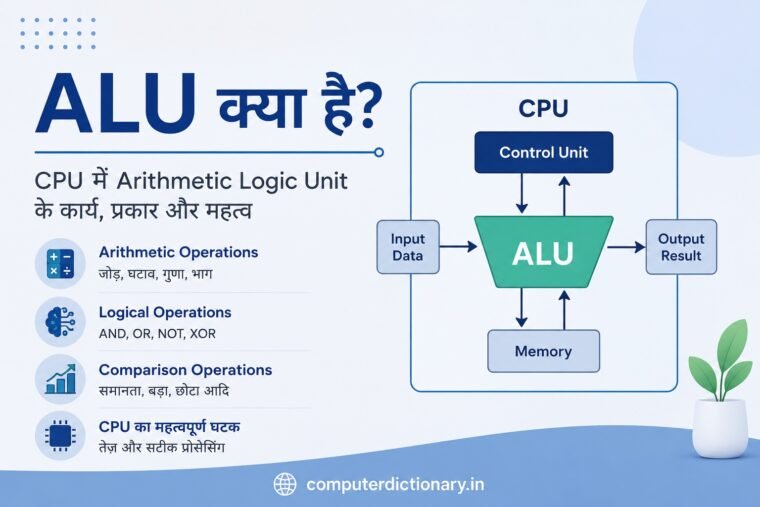
कंप्यूटर हमारे द्वारा दिए गए निर्देशों के अनुसार बहुत तेजी से गणना करता है, डेटा को प्रोसेस करता है और अलग-अलग परिस्थितियों के आधार पर तार्किक निर्णय लेता है। लेकिन क्या आपने कभी सोचा है कि CPU के अंदर वास्तविक जोड़, घटाव, तुलना और Logical Operations कौन करता है?
इन कार्यों को करने में ALU (Arithmetic Logic Unit) की महत्वपूर्ण भूमिका होती है।
ALU को हिंदी में अंकगणितीय एवं तार्किक इकाई कहा जाता है। यह CPU यानी Central Processing Unit का एक महत्वपूर्ण हिस्सा है। कंप्यूटर में जब भी किसी प्रकार की arithmetic calculation या logical comparison करने की आवश्यकता होती है, तो इन operations को पूरा करने में ALU मुख्य भूमिका निभाता है।
इस लेख में हम विस्तार से समझेंगे कि ALU क्या है, ALU का Full Form क्या है, CPU में ALU कैसे काम करता है, इसके प्रमुख कार्य क्या हैं, Arithmetic और Logical Operations क्या होते हैं तथा कंप्यूटर के लिए ALU क्यों महत्वपूर्ण है।
ALU का Full Form क्या है?
ALU का Full Form – Arithmetic Logic Unit होता है।
हिंदी में इसे अंकगणितीय एवं तार्किक इकाई कहा जाता है।
नाम से ही इसके दो प्रमुख कार्यों का पता चलता है:
Arithmetic – गणितीय गणनाएँ करना।
Logic – तार्किक operations और comparisons करना।
उदाहरण के लिए यदि कंप्यूटर को दो संख्याओं को जोड़ना है, तो arithmetic operation की आवश्यकता होगी। वहीं यदि कंप्यूटर को यह पता लगाना है कि दो values समान हैं या उनमें से कौन-सी बड़ी है, तो logical operation की आवश्यकता होगी।
इन दोनों प्रकार के कार्यों में ALU महत्वपूर्ण भूमिका निभाता है।
Table of Contents
ALU क्या है?
ALU क्या है? CPU में Arithmetic Logic Unit के कार्य, प्रकार और महत्व की पूरी जानकारी
ALU (Arithmetic Logic Unit) CPU का वह भाग है जो मुख्य रूप से arithmetic calculations और logical operations करता है।
Arithmetic calculations में सामान्यतः शामिल हैं:
- Addition – जोड़
- Subtraction – घटाव
- Multiplication – गुणा
- Division – भाग
Logical operations में शामिल हो सकते हैं:
- AND
- OR
- NOT
- XOR
- Comparison
- Bit operations
जब किसी software या program द्वारा CPU को calculation करने का instruction मिलता है, तो CPU उस instruction को decode करता है और आवश्यक operation को पूरा करने के लिए संबंधित hardware units का उपयोग करता है। Integer arithmetic और कई logical operations के लिए ALU काम करता है।
इसलिए ALU को कंप्यूटर की processing capability का एक अत्यंत महत्वपूर्ण हिस्सा माना जाता है।
CPU में ALU कहाँ होता है?
ALU सामान्यतः CPU के अंदर मौजूद processing circuitry का हिस्सा होता है।
CPU केवल ALU से नहीं बना होता। आधुनिक CPU में कई अलग-अलग functional units मौजूद हो सकती हैं, जैसे:
- Arithmetic Logic Units
- Control circuitry
- Registers
- Cache Memory
- Floating Point Units
- Load/Store Units
- Execution Units
- Instruction decoding units
सरल कंप्यूटर architecture को समझने के लिए CPU के दो प्रमुख हिस्सों के रूप में अक्सर Control Unit (CU) और Arithmetic Logic Unit (ALU) को समझाया जाता है।
Control Unit instructions को नियंत्रित और coordinate करती है, जबकि ALU calculations और logical operations को execute करने का काम करती है।
ALU कैसे काम करता है?
ALU का काम समझने के लिए एक सरल उदाहरण लेते हैं।
मान लीजिए कंप्यूटर को यह calculation करनी है:
10 + 7
सबसे पहले program में मौजूद instruction CPU तक पहुँचता है। CPU instruction को समझता है और निर्धारित करता है कि addition operation करना है।
इसके बाद आवश्यक operands यानी 10 और 7 processing के लिए उपलब्ध कराए जाते हैं।
ALU इन values पर addition operation करती है:
10 + 7 = 17
Calculation पूरा होने के बाद result आगे register या अन्य संबंधित CPU circuitry में उपलब्ध कराया जा सकता है, जहाँ से program इसे उपयोग कर सकता है।
असल processor architecture इससे काफी अधिक जटिल होता है, लेकिन ALU की मूल भूमिका को इस उदाहरण से आसानी से समझा जा सकता है।
ALU के मुख्य कार्य
ALU कई प्रकार के operations कर सकती है। Processor architecture के अनुसार इसकी वास्तविक capabilities अलग-अलग हो सकती हैं।
इसके प्रमुख कार्यों को मुख्यतः निम्न categories में समझा जा सकता है।
1. Arithmetic Operations
Arithmetic operations ALU के सबसे महत्वपूर्ण कार्यों में से हैं।
इनमें सामान्य गणितीय operations शामिल होते हैं।
Addition – जोड़
दो binary numbers को जोड़ने का कार्य ALU कर सकती है।
उदाहरण:
10 + 7 = 17
Binary में:
10 = 1010
7 = 0111
अब दोनों को जोड़ें:
1010
+ 0111
= 10001
Binary number 10001 decimal में 17 होता है।
कंप्यूटर के अंदर numbers binary form में represent किए जाते हैं, इसलिए ALU binary arithmetic पर काम करती है।
2. Subtraction – घटाव
ALU subtraction operation भी कर सकती है।
उदाहरण:
10 – 7 = 3
Binary में:
10 = 1010
7 = 0111
Result:
0011
Binary 0011 decimal में 3 होता है।
Digital circuits में subtraction को implement करने के लिए binary arithmetic और complement techniques का उपयोग किया जा सकता है।
3. Multiplication – गुणा
Multiplication भी processor के arithmetic processing का महत्वपूर्ण हिस्सा है।
उदाहरण:
5 × 4 = 20
Binary representation:
5 = 0101
4 = 0100
Result:
20 = 10100
Processor architecture के आधार पर multiplication के लिए dedicated multiplier circuitry या specialized execution hardware भी मौजूद हो सकता है।
इसलिए आधुनिक processor में हर arithmetic operation को केवल एक single basic ALU block से जोड़कर देखना पूरी तरह सही नहीं होगा। फिर भी ALU arithmetic processing की मूल अवधारणा समझने के लिए महत्वपूर्ण है।
4. Division – भाग
Division में एक संख्या को दूसरी संख्या से divide किया जाता है।
उदाहरण:
20 ÷ 4 = 5
Binary division भी decimal division की तरह quotient और remainder की अवधारणा पर आधारित होती है, लेकिन calculations binary digits यानी 0 और 1 पर की जाती हैं।
Processor architecture के अनुसार division के लिए dedicated hardware और अलग execution circuitry का उपयोग भी किया जा सकता है।
ALU के Logical Operations
ALU केवल mathematical calculations तक सीमित नहीं होती। इसका दूसरा महत्वपूर्ण काम Logical Operations करना है।
इन operations में binary bits के बीच logical relationships को evaluate किया जाता है।
प्रमुख logical operations हैं:
AND Operation
AND operation में output तभी 1 होता है जब दोनों input 1 हों।
| A | B | A AND B |
| 0 | 0 | 0 |
| 0 | 1 | 0 |
| 1 | 0 | 0 |
| 1 | 1 | 1 |
उदाहरण:
A = 1
B = 1
तो:
A AND B = 1
लेकिन यदि किसी एक input की value 0 है तो output 0 होगा।
OR Operation
OR operation में यदि कम से कम एक input 1 है तो output 1 होता है।
| A | B | A OR B |
| 0 | 0 | 0 |
| 0 | 1 | 1 |
| 1 | 0 | 1 |
| 1 | 1 | 1 |
उदाहरण:
A = 0
B = 1
Result:
A OR B = 1
NOT Operation
NOT operation एक input की logical state को invert करता है।
| A | NOT A |
| 0 | 1 |
| 1 | 0 |
यदि input 1 है तो output 0 होगा।
यदि input 0 है तो output 1 होगा।
इसे logical inversion भी कहा जाता है।
XOR Operation
XOR का अर्थ Exclusive OR है।
इसमें output तब 1 होता है जब दोनों inputs अलग-अलग हों।
| A | B | A XOR B |
| 0 | 0 | 0 |
| 0 | 1 | 1 |
| 1 | 0 | 1 |
| 1 | 1 | 0 |
XOR operation digital electronics, bit manipulation और विभिन्न computing operations में उपयोगी होता है।
ALU और Comparison Operations
CPU को केवल calculations ही नहीं करनी होतीं। Programs में values की तुलना भी लगातार होती रहती है।
उदाहरण:
- क्या A, B से बड़ा है?
- क्या दोनों values समान हैं?
- क्या कोई value zero है?
- क्या कोई number negative है?
ऐसी comparisons program execution के लिए महत्वपूर्ण होती हैं।
उदाहरण के लिए:
10 > 5
इस comparison का result True होगा।
Program इस result के आधार पर अगला instruction चुन सकता है।
Conditional statements जैसे:
if, else, while
आदि में comparison operations का व्यापक उपयोग होता है।
ALU में Flags क्या होते हैं?
कई CPU architectures में arithmetic या logical operation के बाद result से संबंधित कुछ information status flags में reflect होती है।
इन flags का उपयोग processor आगे के decisions में कर सकता है।
कुछ सामान्य flags हैं:
Zero Flag
यदि operation का result zero आता है तो Zero Flag set हो सकता है।
उदाहरण:
5 – 5 = 0
Carry Flag
Arithmetic operation के दौरान यदि result निर्धारित bit width से बाहर carry उत्पन्न करता है, तो Carry Flag महत्वपूर्ण हो सकता है।
Sign Flag
कुछ architectures में result के sign से संबंधित जानकारी Sign Flag द्वारा indicate की जाती है।
Overflow Flag
Signed arithmetic operation में यदि result representable range से बाहर चला जाता है, तो Overflow Flag इसका संकेत दे सकता है।
Flags processor को program instructions और conditional operations execute करने में सहायता करते हैं।
ALU और Registers का संबंध
ALU को calculations करने के लिए operands की आवश्यकता होती है।
CPU के अंदर Registers बहुत तेज storage locations होते हैं। वे processing के दौरान data, addresses या intermediate results को temporary रूप से रख सकते हैं।
सरल conceptual flow इस प्रकार समझा जा सकता है:
Registers → ALU → Result → Register
उदाहरण के लिए एक register में value 10 और दूसरे में value 20 उपलब्ध है।
ALU को addition operation दिया जाता है:
10 + 20 = 30
Result को processor architecture और instruction के अनुसार किसी destination register में रखा जा सकता है।
Registers और execution units के बीच तेज data movement CPU performance के लिए बहुत महत्वपूर्ण होता है।
ALU और Control Unit में अंतर
ALU और Control Unit दोनों CPU architecture को समझने के लिए महत्वपूर्ण concepts हैं, लेकिन इनके कार्य अलग हैं।
| आधार | ALU | Control Unit |
| Full Form | Arithmetic Logic Unit | Control Unit |
| मुख्य कार्य | Arithmetic और logical operations | Instructions और processor operations को control/coordinate करना |
| Calculation | करता है | मुख्य calculation unit नहीं |
| Logic Operations | करता है | execution को नियंत्रित करती है |
| CPU में भूमिका | Data processing | Instruction/control coordination |
सरल शब्दों में कहा जाए तो:
Control Unit बताती है कि क्या करना है और execution circuitry, जिसमें ALU शामिल हो सकती है, operation को पूरा करती है।
ALU और FPU में क्या अंतर है?
ALU के साथ FPU (Floating Point Unit) का नाम भी सुनने को मिलता है।
दोनों calculation से संबंधित हैं, लेकिन इनके उपयोग में अंतर होता है।
ALU मुख्य रूप से integer arithmetic, bitwise और logical operations से संबंधित होती है।
वहीं FPU floating-point calculations के लिए बनाई जाती है।
उदाहरण:
ALU के लिए सरल integer calculation:
25 + 10
Floating-point calculation का उदाहरण:
25.75 × 3.14
आधुनिक processors में integer और floating-point workloads के लिए अलग-अलग execution resources मौजूद हो सकते हैं।
कंप्यूटर में ALU का महत्व
ALU CPU की processing क्षमता के लिए अत्यंत महत्वपूर्ण है।
कंप्यूटर में लगभग हर program किसी न किसी रूप में calculations, comparisons या logical operations का उपयोग करता है।
उदाहरण के लिए:
Calculator में arithmetic calculations होती हैं।
Spreadsheet software में formulas calculate होते हैं।
Games में scores, coordinates, conditions और अनेक calculations process होती हैं।
Operating System को resource management और system operations के दौरान अनेक numerical तथा logical decisions लेने होते हैं।
Programming में loops, conditions और calculations के लिए arithmetic तथा logical operations आवश्यक हैं।
इसी कारण ALU processor architecture का मूलभूत हिस्सा है।
ALU का उपयोग कहाँ होता है?
ALU की अवधारणा केवल desktop computer के CPU तक सीमित नहीं है।
Arithmetic और logical processing circuitry कई प्रकार के digital systems में पाई जाती है, जैसे:
- Desktop Computers
- Laptops
- Smartphones
- Tablets
- Microcontrollers
- Embedded Systems
- Servers
- Gaming Consoles
- Industrial Control Systems
- Automotive Electronics
- IoT Devices
जहाँ digital processing की आवश्यकता होती है, वहाँ किसी न किसी रूप में arithmetic और logical processing hardware की जरूरत होती है।
8-bit, 16-bit, 32-bit और 64-bit ALU क्या है?
ALU के संदर्भ में bit width यह बताने में मदद करती है कि hardware एक operation में कितने bits के data को process करने के लिए designed है।
उदाहरण के लिए:
8-bit ALU – 8-bit operands पर operations करने के लिए design की जा सकती है।
16-bit ALU – 16-bit data operations के लिए।
32-bit ALU – 32-bit data operations के लिए।
64-bit ALU – 64-bit integer operations को support कर सकती है।
हालाँकि आधुनिक CPU architecture में केवल ALU की bit width देखकर पूरे processor की क्षमता निर्धारित नहीं की जा सकती। Instruction Set Architecture, registers, execution units, cache, clock speed, core design और कई अन्य factors भी महत्वपूर्ण होते हैं।
ALU की गति किन बातों पर निर्भर करती है?
ALU की वास्तविक performance को केवल एक factor से नहीं मापा जा सकता।
Processor performance कई factors पर निर्भर करती है:
CPU Architecture
बेहतर architecture एक clock cycle में अधिक useful work करने में सक्षम हो सकती है।
Clock Frequency
Clock frequency processor की operating speed से संबंधित एक महत्वपूर्ण parameter है, लेकिन अकेले clock speed से दो processors की वास्तविक performance की सही तुलना नहीं की जा सकती।
Number of Execution Units
Modern processors में कई execution units हो सकती हैं, जिससे अलग-अलग instructions parallel रूप से process की जा सकती हैं।
Instruction Type
सभी operations समान समय नहीं लेते। Simple addition और complex division की latency अलग हो सकती है।
Data Availability
यदि required data registers या cache में उपलब्ध है, तो processing अधिक efficient हो सकती है। Memory से data आने में delay होने पर CPU को wait करना पड़ सकता है।
Modern CPU में ALU
पुराने या educational CPU diagrams में अक्सर एक single ALU दिखाई जाती है। इससे CPU की basic working समझना आसान होता है।
लेकिन आधुनिक processors काफी complex होते हैं।
एक modern CPU core में कई integer execution units, floating-point/vector units, branch units, load/store units और अन्य specialized hardware मौजूद हो सकते हैं।
इसका अर्थ है कि modern processor कई instructions को overlap या parallel तरीके से execute करने की क्षमता रख सकता है।
इसलिए आज ALU को केवल “CPU के अंदर एक calculator” कहना concept समझने के लिए उपयोगी तो है, लेकिन modern processor architecture की पूरी तस्वीर नहीं बताता।
ALU के फायदे
ALU की प्रमुख विशेषताओं और लाभों को इस प्रकार समझा जा सकता है:
- तेज arithmetic processing
- Logical operations की सुविधा
- Binary data processing
- Comparisons करने की क्षमता
- Program execution में सहायता
- CPU की calculation capability का आधार
- Conditional decisions के लिए status information
- Bitwise operations की processing
ALU के कारण processor mathematical और logical instructions को hardware level पर efficiently execute कर पाता है।
ALU की सीमाएँ
ALU अत्यंत महत्वपूर्ण है, लेकिन CPU की पूरी processing केवल ALU पर निर्भर नहीं करती।
ALU अकेले:
- Instructions fetch नहीं करती
- Main Memory का काम नहीं करती
- Permanent data storage नहीं करती
- पूरे CPU को control नहीं करती
- सभी प्रकार के floating-point calculations की एकमात्र unit नहीं होती
- Graphics rendering के लिए GPU का विकल्प नहीं है
इसीलिए ALU को CPU के कई महत्वपूर्ण components और execution resources में से एक के रूप में समझना चाहिए।
आसान उदाहरण से ALU को समझें
मान लीजिए आपने calculator application में लिखा:
25 + 15
Program processor को addition से संबंधित instruction देता है।
Required values processing के लिए उपलब्ध होती हैं।
Arithmetic execution hardware calculation करता है:
25 + 15 = 40
Result application तक पहुँचता है और screen पर:
40
दिखाई देता है।
अब मान लीजिए program को check करना है:
क्या 40 > 30 है?
Comparison operation का result True होगा।
इस प्रकार arithmetic calculation और logical comparison दोनों ही computer processing के मूल operations हैं।
ALU से जुड़े महत्वपूर्ण शब्द
ALU को बेहतर तरीके से समझने के लिए कुछ संबंधित terms जानना उपयोगी है:
Operand: वह data जिस पर operation किया जाता है।
Opcode: Instruction का वह हिस्सा जो बताता है कि कौन-सा operation करना है।
Register: CPU के अंदर मौजूद high-speed storage location।
Binary Number: 0 और 1 पर आधारित number system।
Logic Gate: Digital circuit का basic building block जो logical operation करता है।
Flag: Operation के result से संबंधित status information।
Instruction: Processor को दिया गया operation या command।
CPU: कंप्यूटर का मुख्य processing component।
हमारे ब्लॉग पर इस से जुड़े अन्य पोस्ट:
- वीडियो ग्राफिक्स ऐरे (वीजीए) क्या है?
- सॉलिड स्टेट ड्राइव एसएसडी क्या है?
- कंप्यूटर पोर्ट क्या हैं?
- चिपसेट क्या है?
संबंधित उत्पाद:
Intel ® Core Ultra 7 Processor 265K,LGA 1700 (30M Cache- up to 5.50 GHz)
ALU से संबंधित अक्सर पूछे जाने वाले प्रश्न – FAQ
ALU का Full Form क्या है?
ALU का Full Form Arithmetic Logic Unit है। हिंदी में इसे अंकगणितीय एवं तार्किक इकाई कहा जाता है।
ALU क्या काम करता है?
ALU arithmetic calculations, logical operations, bitwise operations और विभिन्न comparison operations को execute करने में महत्वपूर्ण भूमिका निभाता है।
ALU कहाँ स्थित होता है?
ALU CPU के अंदर processing/execution circuitry का हिस्सा होता है।
ALU कौन-कौन से Arithmetic Operations करता है?
Basic ALU design में addition और subtraction जैसे operations प्रमुख होते हैं। Processor architecture के अनुसार multiplication, division तथा अन्य arithmetic operations के लिए अतिरिक्त या specialized hardware भी उपलब्ध हो सकता है।
ALU कौन-कौन से Logical Operations करता है?
AND, OR, NOT और XOR जैसे bitwise logical operations ALU से जुड़े सामान्य operations हैं।
ALU और CPU में क्या अंतर है?
CPU पूरा processing unit है, जबकि ALU CPU के अंदर मौजूद एक functional unit या execution component है।
ALU और Control Unit में क्या अंतर है?
ALU calculations और logical operations करती है, जबकि Control Unit processor की instruction execution activities को control और coordinate करती है।
क्या ALU data store करता है?
ALU मुख्यतः processing करती है। Data और intermediate results को रखने के लिए CPU registers, cache और memory hierarchy के अन्य components का उपयोग किया जाता है।
क्या Smartphone में भी ALU होती है?
हाँ। Smartphone processors में भी arithmetic और logical processing के लिए execution hardware मौजूद होता है।
क्या ALU केवल जोड़ और घटाव करती है?
नहीं। ALU arithmetic के साथ logical, comparison और bitwise operations भी कर सकती है। वास्तविक capabilities processor architecture पर निर्भर करती हैं।
निष्कर्ष
ALU (Arithmetic Logic Unit) CPU architecture का एक अत्यंत महत्वपूर्ण हिस्सा है। इसका मुख्य उद्देश्य arithmetic calculations और logical operations को execute करना है।
जोड़, घटाव, binary operations, AND, OR, NOT, XOR तथा comparisons जैसे अनेक operations computer processing के मूल आधार हैं।
जब हम calculator चलाते हैं, spreadsheet में calculation करते हैं, software program execute करते हैं या computer पर कोई complex application इस्तेमाल करते हैं, तो processor के अंदर लगातार mathematical और logical instructions process होती रहती हैं।
हालाँकि modern processors में processing architecture पुराने सरल CPU diagrams की तुलना में काफी complex हो चुकी है और इनमें कई specialized execution units मौजूद होती हैं, फिर भी ALU का concept computer architecture को समझने की बुनियादी नींव है।
यदि आप CPU की working, computer architecture, binary arithmetic और processor technology को समझना चाहते हैं, तो ALU की जानकारी होना बेहद आवश्यक है।
