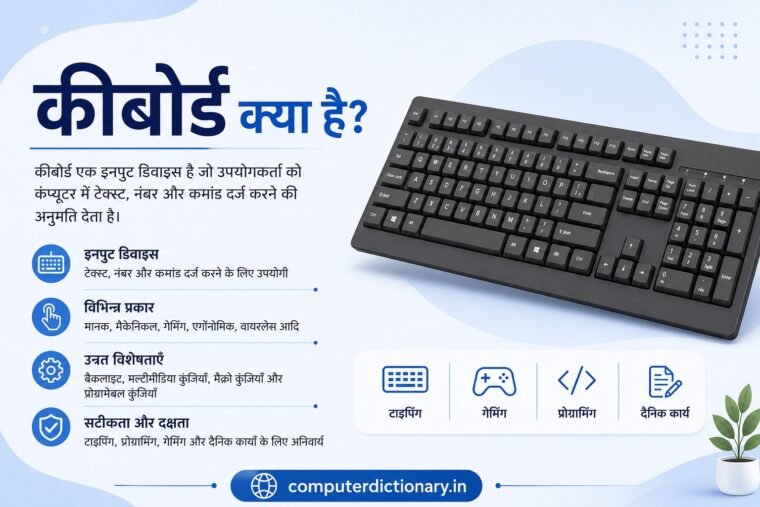
कंप्यूटर में डेटा और instructions दर्ज करने के लिए विभिन्न Input Devices का उपयोग किया जाता है। इनमें Keyboard सबसे अधिक इस्तेमाल होने वाले input devices में से एक है। Computer पर document लिखने, numbers दर्ज करने, commands देने, shortcut keys का उपयोग करने, programming करने और कई अन्य कार्यों के लिए keyboard का उपयोग किया जाता है।
जब हम keyboard पर कोई key दबाते हैं, तो keyboard उस input को computer तक पहुंचाता है। Computer का operating system और संबंधित software उस input को interpret करके आवश्यक action perform करते हैं।
उदाहरण के लिए, यदि आप keyboard पर A key दबाते हैं, तो compatible text field में “A” character दिखाई दे सकता है। इसी प्रकार Enter, Shift, Ctrl, Alt, Function Keys और Arrow Keys का उपयोग अलग-अलग commands और operations के लिए किया जाता है।
आज keyboards कई designs और technologies में उपलब्ध हैं। सामान्य desktop keyboard से लेकर Mechanical Keyboard, Gaming Keyboard, Wireless Keyboard, Ergonomic Keyboard और Virtual Keyboard तक अलग-अलग विकल्प मौजूद हैं।
इस लेख में विस्तार से जानेंगे कि Keyboard क्या है, Keyboard कैसे काम करता है, Keyboard का इतिहास क्या है, Keyboard में कितनी Keys होती हैं, Keyboard Keys कितने प्रकार की होती हैं और Computer Keyboard के विभिन्न प्रकार कौन-कौन से हैं।
Table of Contents
Keyboard क्या है?
Keyboard क्या है? कंप्यूटर कीबोर्ड के प्रकार, Keys, कार्य और पूरी जानकारी
Keyboard एक Input Device है जिसका उपयोग computer या अन्य electronic device में text, numbers, symbols और commands दर्ज करने के लिए किया जाता है।
यह computer के साथ user interaction के सबसे महत्वपूर्ण माध्यमों में से एक है।
Keyboard पर कई अलग-अलग keys मौजूद होती हैं। प्रत्येक key किसी character, number, symbol, function या command से संबंधित हो सकती है।
Keyboard का उपयोग मुख्य रूप से निम्न कार्यों के लिए किया जाता है:
- Text Type करना
- Numbers Enter करना
- Commands देना
- Documents तैयार करना
- Programming करना
- Keyboard Shortcuts इस्तेमाल करना
- Games Control करना
- Applications Navigate करना
- Data Entry करना
- Multimedia Control करना
इसीलिए keyboard office, education, programming, gaming और professional computing में महत्वपूर्ण input device है।
Keyboard एक Input Device क्यों है?
Computer hardware को broadly input और output devices सहित विभिन्न categories में समझा जाता है।
Input Device वह hardware होता है जिसके माध्यम से user computer को data या instructions देता है।
Keyboard पर जब user कोई key press करता है, तो वह computer को input प्रदान करता है।
उदाहरण:
A दबाना → Character Input
5 दबाना → Numeric Input
Enter दबाना → Command/Action Input
Ctrl + C → Supported application में Copy Command
इसलिए Keyboard को Input Device कहा जाता है।
Keyboard कैसे काम करता है?
Keyboard के नीचे keys को detect करने के लिए electronic circuitry और switching mechanism होता है।
जब user कोई key press करता है, तो keyboard उस key press को detect करता है।
Keyboard controller यह पहचानने में मदद करता है कि कौन-सी key press हुई है और संबंधित input information computer तक भेजता है।
Computer का operating system keyboard input को process करता है और active application के context के अनुसार उसका अर्थ निर्धारित करता है।
सरल रूप में:
Key Press → Keyboard Detect करता है → Input Computer तक जाता है → Operating System/Software Process करता है → Result दिखाई देता है
उदाहरण के लिए यदि आप text editor में K दबाते हैं, तो application उस input को character के रूप में प्रदर्शित कर सकती है।
लेकिन यदि उसी key को Ctrl या Alt जैसी modifier key के साथ दबाया जाए, तो software उसे अलग shortcut command के रूप में interpret कर सकता है।
Keyboard का इतिहास
Computer keyboard का विकास सीधे आधुनिक computer से शुरू नहीं हुआ।
Keyboard design पर पुराने typewriters का महत्वपूर्ण प्रभाव रहा है।
आपकी मूल पोस्ट में Christopher Latham Sholes और 1868 का उल्लेख किया गया है। अधिक सटीक रूप से देखें तो Sholes और उनके सहयोगियों ने 1860 के दशक में शुरुआती practical typewriter designs विकसित किए और बाद में QWERTY arrangement typewriter history का महत्वपूर्ण हिस्सा बना।
इसके बाद teleprinters और computer terminals ने keyboard-based data entry को computing से जोड़ा।
Personal computers के विकास के साथ computer keyboard एक standard input device बन गया।
IBM और Modern Computer Keyboard
Personal computer keyboard के विकास में IBM keyboards का महत्वपूर्ण प्रभाव रहा है।
IBM PC era के keyboards ने function keys और computer-oriented controls को popular बनाने में योगदान दिया।
बाद में IBM Model M जैसे keyboards ने enhanced keyboard layout को लोकप्रिय बनाया, जिसका प्रभाव modern full-size PC keyboards में आज भी देखा जा सकता है।
समय के साथ keyboard technology में कई बदलाव हुए:
- Mechanical Switches
- Membrane Technology
- USB Connectivity
- Wireless Connectivity
- Multimedia Keys
- Backlighting
- RGB Lighting
- Programmable Keys
- Compact Layouts
आज keyboard केवल typing device नहीं रह गया है, बल्कि अलग-अलग users और workloads के लिए specialized input device बन चुका है।
QWERTY Keyboard क्या है?
यदि आप अपने computer या laptop keyboard की alphabet keys की सबसे ऊपर वाली row को देखें, तो आपको शुरुआत में:
Q – W – E – R – T – Y
दिखाई देगा।
इसी कारण इस layout को QWERTY Keyboard Layout कहा जाता है।
QWERTY arrangement की जड़ें typewriter design में हैं और बाद में यह computer keyboards में भी व्यापक रूप से अपनाया गया।
आज English-language computer keyboards में QWERTY सबसे सामान्य layouts में से एक है।
इसके अलावा अन्य keyboard layouts भी मौजूद हैं, लेकिन सामान्य personal computers में QWERTY व्यापक रूप से उपयोग किया जाता है।
Keyboard में कितनी Keys होती हैं?
Computer keyboard में keys की संख्या fixed नहीं होती।
यह keyboard के:
- Layout
- Size
- Region
- Manufacturer
- Intended Use
पर निर्भर करती है।
Traditional full-size PC keyboards में अक्सर लगभग 101, 104 या उससे अधिक keys हो सकती हैं।
Gaming और multimedia keyboards में अतिरिक्त macro या media keys होने के कारण key count और बढ़ सकता है।
Compact keyboards में कई keys हटाई या secondary functions में combine की जा सकती हैं।
इसलिए यह कहना अधिक सही है कि keyboard में keys की संख्या उसके layout और design पर निर्भर करती है।
Keyboard Keys के प्रकार
Computer keyboard की keys को उनके कार्य के आधार पर कई categories में समझा जा सकता है।
मुख्य categories हैं:
- Alphanumeric Keys
- Function Keys
- Modifier/Control Keys
- Navigation Keys
- Numeric Keypad
- Special Keys
- Multimedia Keys
1. Alphanumeric Keys
Alphanumeric section keyboard का मुख्य typing area होता है।
इसमें शामिल हैं:
Alphabet Keys
A से Z तक letters।
Number Keys
0 से 9 तक numbers।
Punctuation और Symbol Keys
जैसे:
- Comma
- Period
- Semicolon
- Apostrophe
- Slash
- Brackets
- Hyphen
- Equal Sign
इन keys का उपयोग text, numbers और symbols type करने के लिए किया जाता है।
2. Function Keys क्या हैं?
Keyboard के ऊपर सामान्यतः F1 से F12 तक Function Keys मिलती हैं।
इनका exact कार्य operating system और application पर निर्भर करता है।
उदाहरण के लिए कई Windows applications में:
F1 – Help खोलने के लिए उपयोग हो सकती है।
F2 – Selected file/folder rename करने के लिए उपयोग हो सकती है।
F5 – कई applications और browsers में refresh से संबंधित function कर सकती है।
Function Keys के actions software के अनुसार बदल सकते हैं।
Laptop keyboards में F1–F12 keys brightness, volume या अन्य hardware controls के साथ combined भी हो सकती हैं।
3. Control और Modifier Keys
Modifier keys दूसरी keys के function को बदलने या keyboard shortcuts बनाने में उपयोग होती हैं।
प्रमुख modifier/control keys हैं:
- Ctrl
- Alt
- Shift
- Windows Key
- Command Key (कुछ platforms पर)
उदाहरण:
Ctrl + C – Copy
Ctrl + V – Paste
Ctrl + X – Cut
Ctrl + Z – Undo
Ctrl + S – Save
इन shortcuts का actual behavior application और operating system पर निर्भर कर सकता है।
4. Navigation Keys
Navigation Keys screen, document या interface में movement के लिए उपयोग की जाती हैं।
इनमें शामिल हो सकती हैं:
- Arrow Keys
- Home
- End
- Page Up
- Page Down
Arrow Keys cursor या selection को ऊपर, नीचे, दाएं और बाएं move करने में उपयोग की जाती हैं।
Home और End जैसी keys document या line navigation में उपयोगी हो सकती हैं।
5. Numeric Keypad
Full-size keyboard के right side में अक्सर अलग Numeric Keypad होता है।
इसमें calculator जैसी arrangement में:
- 0 से 9
-
-
-
- /
- Enter
- Decimal
- Num Lock
जैसी keys हो सकती हैं।
Numeric keypad विशेष रूप से:
- Accounting
- Data Entry
- Spreadsheet
- Financial Work
- Repeated Numeric Entry
के लिए उपयोगी है।
Compact keyboards में numeric keypad नहीं भी हो सकता है।
6. Special Keys
Keyboard में कई special-purpose keys होती हैं।
उदाहरण:
Enter Key
Command confirm करने, new line बनाने या selected action execute करने के लिए उपयोग हो सकती है।
Spacebar
Words के बीच space डालने के लिए।
Backspace
Cursor के पहले मौजूद character को delete करने के लिए।
Delete
Selected item या cursor position से संबंधित content हटाने के लिए उपयोग हो सकती है।
Esc
कई applications में current operation cancel या close करने के लिए।
Tab
Text fields या interface elements के बीच navigation तथा document indentation जैसे कार्यों के लिए।
Caps Lock
Alphabet typing में uppercase mode toggle करने के लिए।
7. Multimedia Keys
Modern keyboards में dedicated multimedia controls मिल सकते हैं।
इनसे user जल्दी:
- Volume बढ़ा सकता है
- Volume घटा सकता है
- Mute कर सकता है
- Play/Pause कर सकता है
- Next Track चुन सकता है
- Previous Track चुन सकता है
कुछ keyboards में calculator, browser और अन्य applications के लिए dedicated shortcut buttons भी होते हैं।
Computer Keyboard के प्रकार
आपकी मूल पोस्ट में Standard, Gaming, Mechanical, Ergonomic और Virtual Keyboard बताए गए हैं। इन्हें विस्तार से समझने के साथ कुछ अन्य सामान्य keyboard categories भी जानना उपयोगी है।
1. Standard Keyboard
Standard Keyboard सामान्य desktop computing के लिए बनाया गया keyboard है।
इसमें आमतौर पर:
- QWERTY Layout
- Function Keys
- Arrow Keys
- Control Keys
- Numeric Keypad
हो सकते हैं।
यह office, home, education और general computing के लिए उपयुक्त होता है।
2. Mechanical Keyboard
Mechanical Keyboard में प्रत्येक key के नीचे individual mechanical switch mechanism का उपयोग किया जाता है।
Different switches का typing feel और sound अलग हो सकता है।
Mechanical keyboards को विशेष रूप से:
- Typists
- Programmers
- Gamers
- Keyboard Enthusiasts
पसंद कर सकते हैं।
इनकी प्रमुख characteristics में tactile feedback, अलग switch choices और कई models में अच्छी durability शामिल हो सकती है।
हालांकि mechanical keyboards अक्सर membrane keyboards से महंगे और कुछ switches के साथ अधिक noisy हो सकते हैं।
3. Membrane Keyboard
Membrane keyboards consumer computers में बहुत सामान्य हैं।
इनमें individual mechanical switches के बजाय membrane-based contact system का उपयोग किया जाता है।
इनके संभावित फायदे हैं:
- कम कीमत
- हल्का design
- अपेक्षाकृत शांत typing
- सामान्य उपयोग के लिए पर्याप्त
Office और home computers के साथ मिलने वाले कई keyboards membrane technology का उपयोग करते हैं।
Mechanical Keyboard vs Membrane Keyboard
| विशेषता | Mechanical Keyboard | Membrane Keyboard |
| Switch | Individual Mechanical Switch | Membrane-based mechanism |
| Typing Feel | अधिक distinct हो सकती है | सामान्यतः softer |
| Noise | Switch पर निर्भर, अधिक हो सकती है | अक्सर कम |
| कीमत | सामान्यतः अधिक | सामान्यतः कम |
| Customization | कई models में अधिक | आमतौर पर कम |
| उपयोग | Gaming, Typing, Programming | General Office/Home Use |
सही keyboard personal preference और usage पर निर्भर करता है।
4. Gaming Keyboard
Gaming Keyboard gamers की requirements को ध्यान में रखकर design किया जाता है।
इसमें features हो सकते हैं:
- Programmable Keys
- Macro Keys
- Backlighting
- RGB Lighting
- Media Controls
- Game Mode
- Fast/consistent key response
- Anti-Ghosting या N-Key Rollover support
हर gaming keyboard में ये सभी features होना आवश्यक नहीं है।
Gaming keyboard mechanical या membrane दोनों technologies में उपलब्ध हो सकता है।
5. Ergonomic Keyboard
Ergonomic Keyboard typing posture और comfort को ध्यान में रखकर design किया जाता है।
इनका shape traditional flat keyboard से अलग हो सकता है।
कुछ ergonomic keyboards में:
- Split Layout
- Curved Design
- Tented Sections
- Wrist Support
जैसी features हो सकती हैं।
इनका उद्देश्य लंबे typing sessions में अधिक natural hand और wrist positioning उपलब्ध कराना हो सकता है।
Comfort व्यक्ति और keyboard design पर निर्भर करता है।
6. Wireless Keyboard
Wireless Keyboard computer से physical data cable के बिना connect हो सकता है।
Connectivity के लिए commonly:
- Bluetooth
- Proprietary RF Receiver
का उपयोग किया जा सकता है।
Wireless keyboard के फायदे:
- Cable clutter कम
- Desk अधिक साफ
- Flexible placement
- Laptop/Tablet के साथ सुविधाजनक उपयोग
लेकिन wireless keyboard को battery या charging की आवश्यकता होती है।
7. Wired Keyboard
Wired Keyboard cable के माध्यम से computer से connect होता है।
Modern wired keyboards आमतौर पर USB connection का उपयोग करते हैं।
इसके फायदे:
- Battery की आवश्यकता नहीं
- सरल connection
- Stable connectivity
- अलग-अलग price ranges में उपलब्ध
Desktop computers में wired keyboards आज भी बहुत सामान्य हैं।
Wired Keyboard vs Wireless Keyboard
| विशेषता | Wired Keyboard | Wireless Keyboard |
| Connection | Cable | Bluetooth/RF |
| Battery | आवश्यक नहीं | आवश्यक हो सकती है |
| Desk Setup | Cable मौजूद | कम cable clutter |
| Mobility | कम | अधिक |
| Connectivity | Direct | Wireless link पर निर्भर |
| उपयोग | Desktop, Gaming, Office | Laptop, Tablet, Clean Desk Setup |
8. Virtual Keyboard
Virtual Keyboard एक software-based keyboard है जो physical hardware keyboard के बजाय screen पर दिखाई देता है।
इसका उपयोग:
- Smartphones
- Tablets
- Touchscreen Computers
- Kiosks
- Accessibility scenarios
में किया जा सकता है।
User touchscreen या pointing device के माध्यम से keys select करता है।
Smartphones में इस्तेमाल होने वाला on-screen keyboard virtual keyboard का सबसे परिचित उदाहरण है।
9. Laptop Keyboard
Laptop में keyboard device के chassis में integrated होता है।
Space बचाने के लिए laptop keyboard का layout desktop full-size keyboard से अलग हो सकता है।
कुछ keys secondary functions के साथ combine की जा सकती हैं।
Laptop keyboards में अक्सर Fn Key दी जाती है।
Fn के साथ दूसरी keys का उपयोग:
- Brightness
- Volume
- Keyboard Backlight
- Display controls
जैसे functions के लिए किया जा सकता है।
Keyboard की प्रमुख Features
Modern keyboards केवल basic typing तक सीमित नहीं हैं।
Backlighting
Backlit Keyboard में keys के नीचे illumination होती है।
यह low-light environment में keys देखने में मदद कर सकती है।
Gaming keyboards में multi-color या RGB lighting भी मिल सकती है।
Wireless Connectivity
Bluetooth या RF wireless technology keyboard को cable के बिना computer से connect करने की सुविधा देती है।
Programmable Keys
कुछ keyboards में keys को software के माध्यम से custom actions के लिए configure किया जा सकता है।
यह productivity और specialized workflows में उपयोगी हो सकता है।
Macro Keys
Macro Keys को predefined sequences या commands execute करने के लिए configure किया जा सकता है।
ये gaming और professional software workflows में उपयोगी हो सकती हैं।
Multimedia Controls
Dedicated multimedia controls music और video playback को जल्दी control करने की सुविधा देते हैं।
Anti-Ghosting क्या है?
कुछ keyboards में एक साथ कई keys press करने पर सभी key presses सही तरीके से register नहीं होते।
इस limitation से संबंधित समस्या को सामान्यतः ghosting के संदर्भ में समझाया जाता है।
Gaming keyboards में Anti-Ghosting support specific multi-key combinations को सही तरीके से register करने में मदद कर सकता है।
N-Key Rollover क्या है?
Key Rollover यह बताता है कि keyboard एक साथ दबाई गई कितनी keys को reliably detect/register कर सकता है।
N-Key Rollover वाले keyboards में बड़ी संख्या में simultaneous key presses को register करने की क्षमता हो सकती है।
यह gaming और कुछ specialized typing scenarios में उपयोगी feature है।
Keyboard के फायदे
Keyboard के कई महत्वपूर्ण advantages हैं:
तेज Text Entry
Long documents और large amounts of text लिखने के लिए physical keyboard बहुत efficient input method है।
Keyboard Shortcuts
Shortcuts के माध्यम से कई commands mouse की तुलना में तेजी से execute की जा सकती हैं।
Programming
Code लिखने के लिए keyboard आवश्यक input tool है।
Data Entry
Numbers और structured information दर्ज करने में keyboard विशेष रूप से उपयोगी है।
Gaming
PC games में keyboard अनेक controls और shortcuts उपलब्ध कराता है।
Keyboard के उपयोग
Keyboard का उपयोग केवल typing तक सीमित नहीं है।
यह निम्न क्षेत्रों में व्यापक रूप से उपयोग किया जाता है:
- Office Work
- School और College
- Online Education
- Programming
- Software Development
- Gaming
- Banking
- Accounting
- Data Entry
- Graphic Design Shortcuts
- Video Editing Shortcuts
- Web Browsing
- Communication
- Research
इसलिए keyboard personal और professional computing दोनों में महत्वपूर्ण device है।
Keyboard खरीदते समय किन बातों का ध्यान रखें?
सही keyboard चुनना आपके usage पर निर्भर करता है।
1. उपयोग तय करें
सबसे पहले तय करें कि keyboard मुख्य रूप से किस काम के लिए चाहिए:
- Office
- Typing
- Programming
- Gaming
- Data Entry
- Travel
2. Layout देखें
Full-size, compact या numeric keypad वाला keyboard अपनी जरूरत के अनुसार चुनें।
3. Mechanical या Membrane
Typing feel, noise, budget और preference के अनुसार switch technology चुनें।
4. Wired या Wireless
Desktop setup के लिए wired convenient हो सकता है, जबकि clean desk और mobility के लिए wireless उपयोगी हो सकता है।
5. Build Quality
यदि keyboard का बहुत अधिक उपयोग करना है तो construction और key quality महत्वपूर्ण हैं।
6. Extra Features
अपनी आवश्यकता के अनुसार देखें:
- Backlight
- Multimedia Keys
- Macro Keys
- Programmable Keys
- Wrist Rest
- Wireless Connectivity
सिर्फ अधिक features वाला keyboard हमेशा बेहतर नहीं होता। सही keyboard वह है जो आपके actual usage और comfort के अनुकूल हो।
Keyboard की देखभाल कैसे करें?
Keyboard को लंबे समय तक सही रखने के लिए basic maintenance उपयोगी है।
- Keyboard पर liquid गिरने से बचाएं।
- Dust और debris समय-समय पर साफ करें।
- Keys को अनावश्यक force से न दबाएं।
- Wired keyboard की cable को damage से बचाएं।
- Wireless keyboard की battery/charging पर ध्यान दें।
- Cleaning से पहले device disconnect करना बेहतर है।
- Manufacturer की cleaning instructions का पालन करें।
Keyboard में जमा dust और crumbs typing experience को प्रभावित कर सकते हैं।
हमारे ब्लॉग पर इस से जुड़े अन्य पोस्ट:
- वीडियो ग्राफिक्स ऐरे (वीजीए) क्या है?
- सॉलिड स्टेट ड्राइव एसएसडी क्या है?
- कंप्यूटर पोर्ट क्या हैं?
- चिपसेट क्या है?
संबंधित उत्पाद:
Logitech MK270r Wireless Keyboard and Mouse Combo for Windows
Keyboard से संबंधित FAQs
Keyboard क्या है?
Keyboard एक Input Device है जिसका उपयोग computer में text, numbers, symbols और commands दर्ज करने के लिए किया जाता है।
Keyboard Input Device है या Output Device?
Keyboard एक Input Device है क्योंकि इसके माध्यम से user computer को data और commands देता है।
Keyboard का मुख्य कार्य क्या है?
Keyboard का मुख्य कार्य text, numbers, symbols और commands को computer में input करना है।
Keyboard में कितनी Keys होती हैं?
Keys की संख्या keyboard layout और model पर निर्भर करती है। Traditional full-size PC keyboards में अक्सर लगभग 101, 104 या उससे अधिक keys हो सकती हैं।
QWERTY Keyboard क्या है?
जिस keyboard layout की alphabet row Q-W-E-R-T-Y से शुरू होती है, उसे QWERTY layout कहा जाता है।
Mechanical Keyboard क्या है?
Mechanical Keyboard में प्रत्येक key के लिए individual mechanical switch mechanism का उपयोग किया जाता है।
Membrane Keyboard क्या है?
Membrane Keyboard में key presses detect करने के लिए membrane-based contact mechanism का उपयोग किया जाता है।
Gaming Keyboard क्या है?
Gaming Keyboard gamers को ध्यान में रखकर बनाया गया keyboard है जिसमें programmable keys, macro controls, lighting और gaming-oriented features मिल सकते हैं।
Wireless Keyboard कैसे Connect होता है?
Wireless Keyboard Bluetooth या compatible RF receiver जैसी wireless technologies के माध्यम से connect हो सकता है।
Virtual Keyboard क्या है?
Virtual Keyboard software-based on-screen keyboard है जिसे touchscreen या pointing device के माध्यम से operate किया जा सकता है।
Function Keys कौन-सी हैं?
Traditional PC keyboard में F1 से F12 तक की keys को Function Keys कहा जाता है।
Numeric Keypad क्या है?
Keyboard का calculator-style numeric section Numeric Keypad कहलाता है। यह number entry के लिए विशेष रूप से उपयोगी है।
Ctrl, Alt और Shift किस प्रकार की Keys हैं?
ये Modifier/Control Keys हैं। इनका उपयोग अन्य keys के साथ मिलकर commands और shortcuts execute करने के लिए किया जाता है।
निष्कर्ष
Keyboard कंप्यूटर का एक महत्वपूर्ण Input Device है जिसका उपयोग text, numbers, symbols और commands दर्ज करने के लिए किया जाता है। यह computer और user के बीच interaction के सबसे महत्वपूर्ण माध्यमों में से एक है।
Keyboard की जड़ें पुराने typewriter systems तक जाती हैं और QWERTY layout आज भी व्यापक रूप से उपयोग किया जाता है। Personal computer के विकास के साथ keyboard भी लगातार विकसित हुआ और आज यह कई अलग-अलग designs और technologies में उपलब्ध है।
Modern keyboards में Alphanumeric Keys, Function Keys, Control Keys, Navigation Keys, Numeric Keypad और Multimedia Keys जैसे अलग-अलग sections हो सकते हैं।
आवश्यकता के अनुसार user Standard, Mechanical, Membrane, Gaming, Ergonomic, Wired, Wireless या Virtual Keyboard चुन सकता है।
Office और सामान्य उपयोग के लिए simple keyboard पर्याप्त हो सकता है, जबकि programmer या frequent typist typing feel को प्राथमिकता दे सकता है। Gamer gaming-oriented features वाला keyboard पसंद कर सकता है और mobility चाहने वाला user wireless keyboard चुन सकता है।
इसलिए keyboard खरीदते समय केवल design या lighting नहीं, बल्कि layout, switch technology, connectivity, comfort, build quality, required features और अपने वास्तविक उपयोग को ध्यान में रखना चाहिए।
आज touchscreen और voice input जैसी technologies उपलब्ध होने के बावजूद physical keyboard computer पर लंबे text, programming, data entry और अनेक professional tasks के लिए अत्यंत उपयोगी input device बना हुआ है।
