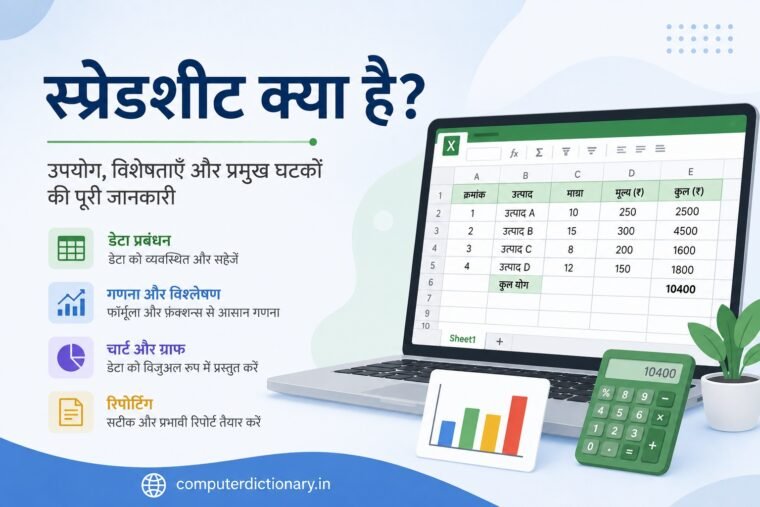
आज कंप्यूटर का उपयोग केवल documents बनाने या Internet चलाने तक सीमित नहीं है। बड़ी मात्रा में Data को व्यवस्थित करने, गणना करने, Budget तैयार करने, Records रखने और Reports बनाने के लिए भी computer का व्यापक उपयोग होता है। इन कार्यों के लिए सबसे उपयोगी tools में से एक है Spreadsheet।
यदि आपने कभी Microsoft Excel, Google Sheets या LibreOffice Calc का उपयोग किया है, तो आप Spreadsheet से परिचित हैं। Spreadsheet की सहायता से हजारों rows और columns में data को व्यवस्थित किया जा सकता है, formulas के माध्यम से calculations की जा सकती हैं और Charts की मदद से data को visual रूप में प्रस्तुत किया जा सकता है।
Students से लेकर teachers, accountants, office employees, business owners और data analysts तक अलग-अलग प्रकार के users Spreadsheet का उपयोग करते हैं।
लेकिन Spreadsheet क्या है? Spreadsheet कैसे काम करता है? इसके प्रमुख components कौन-कौन से हैं और इसका उपयोग कहां किया जाता है?
Table of Contents
इस लेख में हम Spreadsheet के बारे में विस्तार से आसान हिंदी में समझेंगे।
स्प्रेडशीट क्या है?
स्प्रेडशीट क्या है? Spreadsheet के उपयोग, विशेषताएं, Components और Functions की पूरी जानकारी
स्प्रेडशीट (Spreadsheet) एक digital document या computer-based application environment है जिसमें data को Rows और Columns से बने grid के रूप में व्यवस्थित, store, calculate और analyze किया जाता है।
Row और Column के मिलने से बनने वाले प्रत्येक box को Cell कहा जाता है।
Cell में विभिन्न प्रकार का data रखा जा सकता है, जैसे:
- Text
- Numbers
- Dates
- Time
- Formulas
- Functions
उदाहरण के लिए यदि किसी school को विद्यार्थियों के marks का record रखना है, तो Spreadsheet में Student Name, Roll Number, Subject और Marks जैसे अलग-अलग columns बनाए जा सकते हैं।
इसी तरह किसी business में Spreadsheet का उपयोग Sales, Expenses, Inventory और Customer Records के लिए किया जा सकता है।
Spreadsheet का अर्थ क्या है?
Spreadsheet शब्द को समझने के लिए इसे दो भागों में देख सकते हैं:
Spread + Sheet
Traditional accounting और record-keeping में बड़ी sheets पर rows और columns बनाकर financial तथा numerical information लिखी जाती थी।
Computer technology के विकास के साथ यही concept digital form में आ गया।
आज Spreadsheet केवल electronic table नहीं है। इसमें automatic calculations, data analysis, sorting, filtering और charts जैसी अनेक सुविधाएं उपलब्ध होती हैं।
Spreadsheet कैसे काम करता है?
Spreadsheet मुख्य रूप से Rows, Columns और Cells के आधार पर काम करता है।
उदाहरण के लिए:
| Name | Hindi | English | Computer |
| Rahul | 80 | 75 | 90 |
| Priya | 85 | 88 | 95 |
| Amit | 70 | 78 | 82 |
यहां प्रत्येक horizontal line एक Row और प्रत्येक vertical category एक Column है।
किसी Row और Column के intersection पर बनने वाला box Cell कहलाता है।
इन Cells में data enter करने के बाद Spreadsheet software formulas और functions की मदद से calculations कर सकता है।
Spreadsheet के प्रमुख Components
Spreadsheet को अच्छी तरह समझने के लिए इसके basic components को जानना जरूरी है।
1. Cell क्या है?
Cell Spreadsheet की सबसे छोटी basic unit होती है जिसमें data enter किया जाता है।
एक Cell में:
- Text
- Number
- Date
- Formula
- Function
जैसा data रखा जा सकता है।
हर Cell की अपनी location होती है, जिसे Cell Reference से पहचाना जाता है।
उदाहरण:
A1, B2, C5, D10
आदि।
2. Row क्या है?
Row Spreadsheet में horizontally यानी बाएं से दाएं चलने वाली Cells की series होती है।
Rows को सामान्यतः numbers से identify किया जाता है।
उदाहरण:
Row 1
Row 2
Row 3
Row 4
यदि कोई Cell Column B और Row 5 में है, तो उसका Cell Reference B5 होगा।
3. Column क्या है?
Column Spreadsheet में vertically यानी ऊपर से नीचे चलने वाली Cells की series होती है।
Columns को सामान्यतः letters से identify किया जाता है।
उदाहरण:
A, B, C, D…
इसलिए Spreadsheet में किसी Cell का address उसके Column और Row के combination से बनता है।
Cell Reference क्या है?
Spreadsheet में प्रत्येक Cell को identify करने के लिए एक address दिया जाता है, जिसे Cell Reference कहते हैं।
उदाहरण:
A1
इसमें:
A = Column
और
1 = Row
इसलिए A1 का अर्थ है Column A और Row 1 के intersection पर स्थित Cell।
इसी प्रकार:
B5 = Column B + Row 5
C10 = Column C + Row 10
Cell References formulas और calculations में बहुत महत्वपूर्ण होते हैं।
Active Cell क्या है?
Spreadsheet में जिस Cell को वर्तमान समय में select किया गया होता है उसे Active Cell कहा जाता है।
यदि आपने Cell B3 पर click किया है, तो B3 Active Cell हो सकता है।
आप जो data type करते हैं वह सामान्यतः Active Cell में enter होता है।
Active Cell अक्सर border या selection indicator से highlight दिखाई देता है।
Cell Range क्या है?
एक से अधिक Cells के group को Cell Range कहा जाता है।
उदाहरण:
A1:A10
का अर्थ A1 से A10 तक की Cells का range है।
इसी तरह:
A1:C5
एक ऐसा range है जिसमें A से C columns और 1 से 5 rows के बीच की Cells शामिल होती हैं।
Ranges का उपयोग formulas, functions, formatting और charts जैसे कार्यों में किया जाता है।
Worksheet क्या है?
Worksheet Spreadsheet file के अंदर मौजूद individual sheet होती है जिसमें Rows, Columns और Cells का grid होता है।
आप एक Worksheet में sales data और दूसरी Worksheet में expenses data रख सकते हैं।
उदाहरण:
- Sheet1 – Sales
- Sheet2 – Expenses
- Sheet3 – Profit
- Sheet4 – Inventory
इस प्रकार data को अलग-अलग Worksheets में व्यवस्थित किया जा सकता है।
Workbook क्या है?
कई Spreadsheet applications में पूरी Spreadsheet file को Workbook कहा जाता है।
एक Workbook के अंदर एक या एक से अधिक Worksheets हो सकती हैं।
सरल उदाहरण:
Workbook = पूरी Notebook
Worksheet = Notebook का एक Page
यह तुलना Workbook और Worksheet के अंतर को समझने में मदद करती है।
Formula क्या है?
Spreadsheet की सबसे महत्वपूर्ण सुविधाओं में से एक Formula है।
Formula का उपयोग Cells में मौजूद values पर calculations करने के लिए किया जाता है।
बहुत से spreadsheet programs में Formula सामान्यतः equal sign (=) से शुरू होता है।
उदाहरण:
=A1+B1
यह Formula A1 और B1 में मौजूद values को जोड़ सकता है।
इसी तरह:
=A1-B1
subtraction के लिए,
=A1*B1
multiplication के लिए और
=A1/B1
division के लिए इस्तेमाल किया जा सकता है।
Spreadsheet formulas का बड़ा फायदा यह है कि referenced Cells की values बदलने पर result स्वतः recalculate हो सकता है।
Spreadsheet Function क्या है?
Function एक predefined formula होता है जिसे specific calculation या data-processing task के लिए बनाया गया होता है।
उदाहरण के लिए यदि A1 से A10 तक numbers हैं, तो उनका total निकालने के लिए कई spreadsheet applications में:
=SUM(A1:A10)
का उपयोग किया जा सकता है।
यह A1 से A10 तक के selected range की numerical values को जोड़ने के लिए इस्तेमाल किया जाता है।
Functions manual calculations को कम करने और complex calculations को आसान बनाने में मदद करते हैं।
Spreadsheet के प्रमुख Functions
Spreadsheet software में बहुत से functions उपलब्ध हो सकते हैं। कुछ commonly used functions निम्न हैं:
SUM Function
Numbers को जोड़ने के लिए।
=SUM(A1:A10)
AVERAGE Function
Selected numbers का average निकालने के लिए।
=AVERAGE(A1:A10)
MAX Function
Range में सबसे बड़ी numerical value पता करने के लिए।
=MAX(A1:A10)
MIN Function
Range में सबसे छोटी numerical value पता करने के लिए।
=MIN(A1:A10)
COUNT Function
Specified range में numerical entries को count करने के लिए उपयोग किया जा सकता है।
=COUNT(A1:A10)
इन functions का exact behavior Spreadsheet software और data type के अनुसार समझना चाहिए।
Formula Bar क्या है?
कई Spreadsheet applications में Formula Bar वह area होता है जहां selected Cell का data या Formula देखा और edit किया जा सकता है।
यदि किसी Cell में:
=SUM(A1:A10)
लिखा है, तो Cell में calculation का result दिखाई दे सकता है, जबकि Formula Bar में underlying formula देखा जा सकता है।
यह complex formulas edit करने में काफी उपयोगी है।
Name Box क्या है?
कुछ spreadsheet programs में Formula Bar के पास Name Box होता है।
यह selected Cell का reference दिखा सकता है।
उदाहरण के लिए यदि C5 Cell selected है, तो Name Box में:
C5
दिखाई दे सकता है।
कुछ applications में Name Box की सहायता से किसी specific cell या named range तक navigate भी किया जा सकता है।
Spreadsheet में Data के प्रकार
Spreadsheet में अलग-अलग प्रकार का data रखा जा सकता है।
1. Text Data
जैसे:
Rahul
Computer
Delhi
Product A
2. Numeric Data
जैसे:
100
2500
75.5
45000
3. Date और Time
Spreadsheet में dates और times भी enter और format किए जा सकते हैं।
4. Formula
उदाहरण:
=A1+B1
5. Function
उदाहरण:
=SUM(A1:A10)
Data type सही होना calculations और analysis के लिए महत्वपूर्ण है।
Spreadsheet का उपयोग कहां किया जाता है?
Spreadsheet का उपयोग बहुत व्यापक है।
इसे personal, educational और professional सभी प्रकार के कार्यों में इस्तेमाल किया जाता है।
1. Data Management
Spreadsheet का सबसे basic उपयोग data को व्यवस्थित करना है।
इसमें:
- Customer List
- Student Records
- Employee Records
- Product Details
- Contact List
- Inventory
जैसा structured data रखा जा सकता है।
Rows और Columns के कारण information को व्यवस्थित तरीके से पढ़ना और update करना आसान होता है।
2. Budget बनाने में
Personal और business budgeting के लिए Spreadsheet बहुत उपयोगी है।
आप columns बना सकते हैं:
- Income
- Rent
- Electricity
- Food
- Transport
- Savings
और formulas की मदद से total income, total expenses तथा remaining balance calculate कर सकते हैं।
इसलिए household budgeting से लेकर business budgeting तक Spreadsheet का व्यापक उपयोग होता है।
3. Financial Analysis
Businesses और professionals Spreadsheet का उपयोग financial data को organize और analyze करने के लिए कर सकते हैं।
उदाहरण:
- Revenue
- Expenses
- Profit
- Loss
- Monthly Sales
- Annual Budget
Formula और Functions calculations को अधिक efficient बना सकते हैं।
4. Inventory Management
Shop या business में products का stock track करने के लिए Spreadsheet उपयोगी हो सकता है।
उदाहरण:
| Product | Quantity | Price | Stock Status |
| Keyboard | 25 | 800 | Available |
| Mouse | 40 | 500 | Available |
इस तरह business यह track कर सकता है कि कौन-सा product उपलब्ध है और किस product का stock कम हो रहा है।
बड़े और complex inventory operations के लिए dedicated inventory software अधिक उपयुक्त हो सकता है।
5. Student Marks और Result
Schools, teachers और students के लिए Spreadsheet काफी उपयोगी है।
इसमें:
- Student Name
- Roll Number
- Subject Marks
- Total
- Average
जैसी information रखी जा सकती है।
Functions की मदद से total और average automatically calculate किए जा सकते हैं।
6. Attendance Management
Spreadsheet में attendance record भी रखा जा सकता है।
उदाहरण:
| Student | Monday | Tuesday | Wednesday |
| Rahul | Present | Present | Absent |
| Priya | Present | Present | Present |
इसी प्रकार office employee attendance भी track की जा सकती है।
Spreadsheet में Sorting क्या है?
Sorting का अर्थ data को किसी निश्चित क्रम में व्यवस्थित करना है।
उदाहरण:
Names को:
A → Z
या:
Z → A
क्रम में sort किया जा सकता है।
Numbers को:
Smallest → Largest
या:
Largest → Smallest
क्रम में व्यवस्थित किया जा सकता है।
Sorting बड़ी data list को समझने और organize करने में मदद करती है।
Spreadsheet में Filtering क्या है?
Filtering की सहायता से data के केवल उन records को दिखाया जाता है जो selected conditions को पूरा करते हैं।
उदाहरण के लिए यदि आपके पास 1,000 products का data है और आप केवल “Available” products देखना चाहते हैं, तो Filter उपयोगी हो सकता है।
Filter मूल data को जरूरी नहीं कि delete करे; यह view को specific criteria के आधार पर सीमित कर सकता है।
Data analysis में filtering बहुत उपयोगी feature है।
Spreadsheet में Chart क्या है?
Spreadsheet के data को visual रूप में प्रस्तुत करने के लिए Charts और Graphs का उपयोग किया जाता है।
Common charts में शामिल हो सकते हैं:
- Column Chart
- Bar Chart
- Line Chart
- Pie Chart
- Area Chart
Charts की मदद से numbers को केवल table में देखने के बजाय visual pattern के रूप में समझा जा सकता है।
उदाहरण के लिए 12 महीनों की sales को Line Chart में दिखाने से यह समझना आसान हो सकता है कि sales किस महीने बढ़ी या घटी।
Data Visualization क्या है?
Data को Charts, Graphs और अन्य visual elements की सहायता से प्रस्तुत करने की प्रक्रिया को सामान्यतः Data Visualization कहा जाता है।
Spreadsheet में Data Visualization की मदद से:
- Trends समझे जा सकते हैं।
- Comparisons किए जा सकते हैं।
- Reports अधिक readable बनाई जा सकती हैं।
- Patterns को पहचानना आसान हो सकता है।
यही कारण है कि reporting और analysis में Spreadsheet काफी उपयोगी है।
Spreadsheet के प्रमुख Software
Spreadsheet बनाने के लिए कई software और applications उपलब्ध हैं।
1. Microsoft Excel
Microsoft Excel दुनिया के सबसे प्रसिद्ध Spreadsheet applications में से एक है।
इसमें data entry, formulas, functions, charts, sorting, filtering और advanced data-analysis features उपलब्ध होते हैं।
Excel का उपयोग education, offices, accounting, finance और business सहित अनेक क्षेत्रों में किया जाता है।
2. Google Sheets
Google Sheets एक cloud-based Spreadsheet application है।
इसका एक महत्वपूर्ण लाभ online collaboration है।
एक ही Spreadsheet पर कई authorized users मिलकर काम कर सकते हैं और changes साझा कर सकते हैं।
यह online work और team collaboration के लिए उपयोगी है।
3. LibreOffice Calc
LibreOffice Calc एक free और open-source Spreadsheet application है।
यह LibreOffice suite का हिस्सा है।
इसमें सामान्य Spreadsheet tasks जैसे formulas, functions, formatting, charts और data management किए जा सकते हैं।
Spreadsheet और Database में अंतर
Spreadsheet और Database दोनों data store कर सकते हैं, लेकिन दोनों का उद्देश्य और structure अलग हो सकता है।
| Spreadsheet | Database |
| Rows और Columns में data | Structured database tables/relationships |
| Manual analysis के लिए आसान | बड़े structured data systems के लिए उपयोगी |
| Formulas और Charts उपलब्ध | Query और data management पर अधिक focus |
| छोटे/मध्यम datasets के लिए सुविधाजनक | Complex और बड़े data systems के लिए उपयुक्त |
| End-user calculations आसान | Dedicated database management capabilities |
हर परिस्थिति में Spreadsheet database का replacement नहीं होता।
छोटे और flexible analysis tasks के लिए Spreadsheet उपयोगी है, जबकि complex relational data systems के लिए Database अधिक उपयुक्त हो सकता है।
Spreadsheet के फायदे
Spreadsheet के कई महत्वपूर्ण फायदे हैं।
Data व्यवस्थित करना
Rows और Columns में information को structured रूप में रखा जा सकता है।
Automatic Calculation
Formulas और Functions calculations को automate कर सकते हैं।
Data Analysis
Sorting, Filtering और Functions की मदद से data analyze किया जा सकता है।
Charts और Graphs
Data को visual format में प्रस्तुत किया जा सकता है।
Editing आसान
Data को update और modify करना सरल होता है।
Reports बनाना
Business, education और personal work के लिए reports तैयार की जा सकती हैं।
Time Saving
बार-बार manual calculations करने की आवश्यकता कम हो सकती है।
Spreadsheet की सीमाएं
Spreadsheet बहुत उपयोगी है, लेकिन इसकी कुछ limitations भी हैं।
Human Error
गलत data entry या गलत Formula से incorrect result आ सकता है।
Complex Files
बहुत बड़ी और complicated Spreadsheet को manage करना कठिन हो सकता है।
Data Security
Sensitive information वाली Spreadsheet को उचित access control और protection की आवश्यकता होती है।
Version Confusion
यदि एक ही file की कई copies अलग-अलग लोगों के पास हों तो latest version पहचानने में समस्या हो सकती है।
Database का पूर्ण विकल्प नहीं
बहुत बड़े, relational या transaction-heavy data systems के लिए dedicated database अधिक उपयुक्त हो सकता है।
Spreadsheet सीखना क्यों जरूरी है?
आज Spreadsheet skills education और employment दोनों में उपयोगी हैं।
Students इसका उपयोग:
- Projects
- Marks
- Research Data
- Assignments
के लिए कर सकते हैं।
Office employees:
- Reports
- Data Entry
- Attendance
- Expenses
- Sales
के लिए Spreadsheet का उपयोग कर सकते हैं।
Business owners इसका उपयोग Budget, Sales और Inventory tracking के लिए कर सकते हैं।
इसलिए basic Spreadsheet knowledge एक महत्वपूर्ण computer skill मानी जा सकती है।
हमारे ब्लॉग पर इस से जुड़े अन्य पोस्ट:
- वीडियो ग्राफिक्स ऐरे (वीजीए) क्या है?
- सॉलिड स्टेट ड्राइव एसएसडी क्या है?
- कंप्यूटर पोर्ट क्या हैं?
- चिपसेट क्या है?
संबंधित उत्पाद:
Microsoft Excel Formulas and Functions (Office 2021 and Microsoft 365) by Paul McFedries (Author)
Spreadsheet से जुड़े सामान्य प्रश्न (FAQs)
Spreadsheet क्या है?
Spreadsheet एक digital document/application environment है जिसमें data को Rows, Columns और Cells के रूप में व्यवस्थित किया जाता है। इसका उपयोग calculations, data management और analysis के लिए किया जाता है।
Spreadsheet में Cell क्या है?
Row और Column के intersection पर बनने वाली सबसे छोटी data-entry unit को Cell कहा जाता है।
Cell Reference क्या है?
Spreadsheet में Cell की location को Cell Reference कहा जाता है। उदाहरण के लिए A1, B5 और C10।
Row और Column में क्या अंतर है?
Row horizontal direction में होती है और सामान्यतः numbers से पहचानी जाती है। Column vertical direction में होता है और सामान्यतः letters से पहचाना जाता है।
Worksheet क्या है?
Worksheet Spreadsheet Workbook के अंदर मौजूद individual sheet होती है जिसमें Cells, Rows और Columns होते हैं।
Workbook क्या है?
एक Spreadsheet file जिसमें एक या अधिक Worksheets हो सकती हैं, उसे कई applications में Workbook कहा जाता है।
Formula क्या है?
Formula Spreadsheet में calculation करने के लिए बनाया गया expression होता है। उदाहरण: =A1+B1
Function क्या है?
Function predefined formula होता है, जैसे SUM, AVERAGE, MAX और MIN।
Spreadsheet का उपयोग कहां होता है?
Spreadsheet का उपयोग budgeting, accounting, student records, inventory, attendance, data analysis, financial reports और charts बनाने सहित कई कार्यों में किया जाता है।
Spreadsheet Software के उदाहरण क्या हैं?
Microsoft Excel, Google Sheets और LibreOffice Calc प्रमुख Spreadsheet applications के उदाहरण हैं।
निष्कर्ष
Spreadsheet कंप्यूटर का एक अत्यंत उपयोगी और बहुउद्देशीय tool है जिसका उपयोग data को व्यवस्थित करने, store करने, calculate करने, analyze करने और visual रूप में प्रस्तुत करने के लिए किया जाता है।
Spreadsheet का आधार Rows, Columns और Cells होते हैं। प्रत्येक Cell को A1, B2 या C5 जैसे Cell Reference से पहचाना जा सकता है।
Formulas और Functions Spreadsheet की सबसे शक्तिशाली सुविधाओं में से हैं। इनकी मदद से बड़ी मात्रा में numerical data पर calculations को आसान और तेज बनाया जा सकता है।
इसके अलावा Sorting, Filtering, Charts और Data Visualization जैसे features Spreadsheet को केवल data-entry tool से आगे ले जाकर एक उपयोगी analysis और reporting tool बनाते हैं।
Microsoft Excel, Google Sheets और LibreOffice Calc जैसे Spreadsheet applications education, offices, finance, business और personal data management में व्यापक रूप से उपयोग किए जाते हैं।
चाहे आप student हों, teacher हों, office professional हों या business owner, basic Spreadsheet skills सीखना आपके computer knowledge को बेहतर बनाने के साथ-साथ data के साथ अधिक व्यवस्थित और प्रभावी तरीके से काम करने में मदद कर सकता है।
