आज Digital Art, Graphic Designing, Photo Editing और Online Teaching जैसे क्षेत्रों में Pen Tablet का उपयोग तेजी से बढ़ा है। Mouse और keyboard computer के सामान्य input devices हैं, लेकिन drawing, sketching या handwriting जैसे काम mouse से प्राकृतिक तरीके से करना आसान नहीं होता। इसी समस्या को हल करने के लिए Pen Tablet एक उपयोगी input device के रूप में काम करता है।
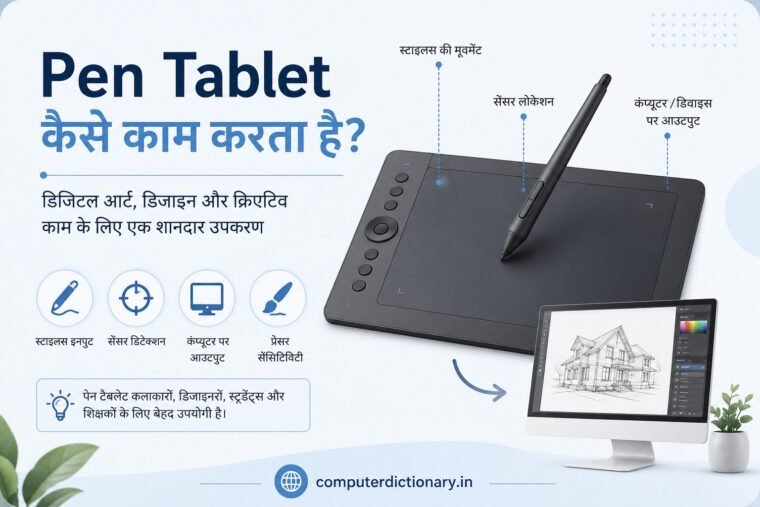
Pen Tablet को Graphics Tablet, Drawing Tablet या Digitizing Tablet भी कहा जाता है। इसमें एक flat drawing surface और एक विशेष pen या stylus होता है। User stylus को tablet की surface पर चलाता है और tablet उसकी position तथा movement को detect करके computer तक पहुंचाता है।
Advanced Pen Tablets stylus द्वारा लगाए गए pressure को भी detect कर सकते हैं। इससे digital brush की thickness, opacity और दूसरे parameters को control करना संभव हो जाता है।
लेकिन सवाल यह है कि Pen Tablet कैसे काम करता है? Stylus की position computer को कैसे पता चलती है? Pressure Sensitivity क्या है? और Pen Tablet तथा सामान्य Touchscreen में क्या अंतर है?
इस article में हम Pen Tablet की working technology को आसान हिंदी में विस्तार से समझेंगे।
Table of Contents
Pen Tablet क्या है?
Pen Tablet कैसे काम करता है? जानिए Graphics Tablet की Technology, Features और उपयोग
Pen Tablet एक computer input device है जिसकी सहायता से stylus के माध्यम से drawing, handwriting, designing और अन्य graphical input computer में दिया जा सकता है।
यह सामान्यतः दो मुख्य components से मिलकर बना होता है:
- Tablet Surface
- Stylus या Digital Pen
Tablet की active surface user के stylus की position और movement को detect करती है।
यह information computer को भेजी जाती है और संबंधित software इसे cursor movement, brush stroke, handwriting या अन्य digital input में बदल देता है।
इसी कारण artist कागज पर pencil चलाने जैसी movement करके computer पर digital drawing बना सकता है।
Pen Tablet कैसे काम करता है?
Pen Tablet की working को समझने का सबसे आसान तरीका यह है कि इसे एक विशेष input surface के रूप में देखा जाए।
Tablet की surface के अंदर sensing system होता है। Stylus जब active area के ऊपर आता है या उस पर चलता है, तो tablet उसकी position detect करता है।
Tablet प्राप्त information को computer तक पहुंचाता है।
इसके बाद installed driver और application उस input को interpret करते हैं।
उदाहरण के लिए आप किसी drawing software में brush tool select करते हैं और stylus को tablet पर दाईं ओर चलाते हैं।
Tablet stylus की movement detect करता है।
Computer को movement information मिलती है।
Software उसी के अनुसार screen पर brush stroke बनाता है।
यह process इतनी तेजी से होता है कि user को लगभग real-time drawing experience मिलता है।
Pen Tablet की Working को Step-by-Step समझें
Pen Tablet की पूरी working को कुछ आसान steps में समझा जा सकता है।
Step 1: Stylus Tablet के Active Area में आता है
Pen Tablet की पूरी physical surface हमेशा active drawing area नहीं होती।
Manufacturer tablet का एक निश्चित हिस्सा input के लिए निर्धारित करता है, जिसे Active Area कहा जाता है।
जब stylus इस area में आता है तो tablet उसे detect करना शुरू कर सकता है।
Step 2: Tablet Stylus की Position Detect करता है
Tablet sensing technology की सहायता से यह निर्धारित करता है कि stylus active area में किस position पर मौजूद है।
यानी tablet को X और Y coordinates की जानकारी मिलती है।
इन्हीं coordinates की मदद से stylus की position screen पर map की जाती है।
Step 3: Stylus की Movement Track होती है
अब यदि user stylus को tablet की surface पर चलाता है तो उसकी बदलती position लगातार detect की जाती है।
Tablet इस movement information को connected computer या compatible device तक भेजता है।
Step 4: Driver Input को Process करता है
Pen Tablet के साथ driver software महत्वपूर्ण भूमिका निभा सकता है।
Driver hardware और operating system/application के बीच communication में सहायता करता है।
इसके माध्यम से pressure sensitivity, buttons और tablet mapping जैसे features configure किए जा सकते हैं।
Step 5: Software Digital Stroke बनाता है
Drawing या graphics application tablet से मिलने वाली information को process करता है।
Stylus की movement के अनुसार screen पर line, brush stroke, selection या दूसरा graphical action दिखाई देता है।
इस तरह physical stylus movement digital output में बदल जाती है।
Pen Tablet में Sensor Grid क्या होता है?
आपकी मूल post में Pen Tablet की surface के अंदर sensors के grid का उल्लेख किया गया है। यही sensing system stylus की position और input को पहचानने में महत्वपूर्ण भूमिका निभाता है।
Tablet की active surface user को सामान्य flat surface जैसी दिखाई देती है, लेकिन उसके अंदर electronic sensing components मौजूद होते हैं।
इनका उद्देश्य stylus की location और movement से संबंधित information प्राप्त करना होता है।
Stylus जैसे-जैसे surface पर चलता है, tablet उसकी position track करता रहता है।
यही tracking digital drawing को precise बनाने में मदद करती है।
Stylus क्या होता है?
Stylus Pen Tablet के साथ इस्तेमाल किया जाने वाला विशेष pen-shaped input device है।
यह देखने में सामान्य pen या pencil जैसा हो सकता है, लेकिन इसका उद्देश्य tablet को digital input देना है।
Stylus की सहायता से user:
- Drawing कर सकता है
- Sketch बना सकता है
- Handwriting लिख सकता है
- Digital painting कर सकता है
- Photo retouch कर सकता है
- Objects select कर सकता है
- Notes और diagrams बना सकता है
कई stylus में programmable buttons भी दिए जाते हैं।
इन buttons को software या tablet driver के माध्यम से अलग-अलग functions के लिए configure किया जा सकता है।
उदाहरण के लिए button को right-click, eraser या किसी shortcut के लिए assign किया जा सकता है।
Pressure Sensitivity क्या है?
Pen Tablet की सबसे महत्वपूर्ण विशेषताओं में से एक Pressure Sensitivity है।
Pressure Sensitivity का अर्थ है कि tablet/stylus system यह पहचान सकता है कि user stylus को कितने pressure के साथ इस्तेमाल कर रहा है।
Digital drawing software इस pressure information का उपयोग brush behavior बदलने के लिए कर सकता है।
उदाहरण के लिए compatible settings में हल्के pressure पर पतली line और अधिक pressure पर मोटी line बनाई जा सकती है।
इसी प्रकार कुछ applications में pressure को opacity या दूसरे brush parameters से जोड़ा जा सकता है।
इससे digital drawing mouse की तुलना में अधिक expressive हो सकती है।
Pressure Levels क्या होते हैं?
Pen Tablets की specifications में आपको अक्सर Pressure Levels लिखा दिखाई देगा।
यह stylus pressure detection capability से संबंधित specification है।
अलग-अलग models अलग pressure-level specifications के साथ आते हैं।
लेकिन केवल pressure level की बड़ी संख्या देखकर Pen Tablet चुनना उचित नहीं है।
Actual drawing experience में driver quality, software compatibility, stylus response, active area और overall implementation भी महत्वपूर्ण होते हैं।
Tilt Sensitivity क्या है?
कुछ advanced Pen Tablets stylus के pressure के अलावा उसके Tilt को भी detect कर सकते हैं।
Tilt का अर्थ है stylus किस angle पर रखा गया है।
Traditional pencil या brush को angle पर पकड़ने से उसका stroke बदल सकता है। Digital art applications में compatible tilt support इसी तरह अधिक natural brush behavior प्रदान करने में मदद कर सकता है।
यह feature विशेष रूप से:
- Digital Painting
- Shading
- Illustration
- Concept Art
जैसे कामों में उपयोगी हो सकता है।
हालांकि tilt functionality tablet और software दोनों के support पर निर्भर करती है।
Pen Tablet में Hover Detection क्या है?
कई graphics tablets stylus को surface छूने से पहले ही एक निश्चित दूरी के भीतर detect कर सकते हैं।
इससे stylus को tablet के ऊपर move करके cursor position देखना संभव होता है।
जब stylus surface को touch करता है तब drawing या clicking action किया जा सकता है।
यह behavior traditional drawing से थोड़ा अलग हो सकता है, इसलिए नए users को Pen Tablet इस्तेमाल करने की आदत डालने में कुछ समय लग सकता है।
Tablet और Screen की Mapping कैसे होती है?
यह Pen Tablet की working का बहुत महत्वपूर्ण concept है।
Graphics tablet की active surface computer screen के area के साथ map की जा सकती है।
मान लीजिए tablet का upper-left area screen के upper-left area को represent करता है।
यदि आप stylus को tablet के दूसरे हिस्से पर ले जाते हैं, तो cursor corresponding screen position पर पहुंच सकता है।
इसे समझना mouse और Pen Tablet के बीच अंतर को समझने में मदद करता है।
Mouse का movement अक्सर relative movement की तरह काम करता है, जबकि Pen Tablet को absolute positioning के साथ configure किया जा सकता है।
इसी कारण शुरुआत में mouse से Pen Tablet पर आने वाले users को थोड़ा practice करना पड़ सकता है।
Pen Tablet के मुख्य Components
एक सामान्य Pen Tablet system में निम्न components हो सकते हैं:
1. Tablet Surface
यह वह area है जिस पर stylus इस्तेमाल किया जाता है।
2. Active Area
Tablet surface का वह निर्धारित हिस्सा जहां stylus input detect किया जाता है।
3. Stylus
Pen-shaped input device जिससे user drawing और अन्य operations करता है।
4. Express Keys
कुछ tablets में programmable shortcut buttons दिए जाते हैं।
5. Connection Interface
Tablet USB या supported wireless connection के माध्यम से computer/device से connect हो सकता है।
6. Driver Software
Driver tablet की settings और operating system के साथ communication manage करने में सहायता करता है।
Pen Tablet के प्रकार
आपकी मूल post में Pen Tablets को passive और active प्रकारों के संदर्भ में समझाया गया है। Practical market usage में Pen Tablets को उनके design और working style के आधार पर भी समझना उपयोगी है।
1. Screenless Pen Tablet
यह सबसे सामान्य graphics tablet design है।
इसमें tablet पर display नहीं होता।
User tablet surface पर stylus चलाता है लेकिन drawing computer monitor पर दिखाई देती है।
इसलिए शुरुआत में hand और eye coordination सीखने की आवश्यकता पड़ सकती है।
Screenless Pen Tablets compact और relatively affordable options में उपलब्ध हो सकते हैं।
2. Pen Display
Pen Display में drawing surface के साथ screen भी मौजूद होती है।
User सीधे display पर stylus से draw कर सकता है।
इसका experience paper पर drawing करने के ज्यादा करीब महसूस हो सकता है।
हालांकि Pen Display और basic screenless graphics tablet की कीमत, connectivity तथा hardware requirements अलग हो सकती हैं।
Pen Tablet और Touchscreen में अंतर
Pen Tablet और Touchscreen दोनों input लेने के लिए उपयोग किए जा सकते हैं, लेकिन दोनों एक जैसी technology या use case के लिए जरूरी नहीं हैं।
Touchscreen मुख्य रूप से finger touch और compatible stylus input के लिए बनाया जा सकता है।
Graphics Pen Tablet विशेष रूप से precise stylus input, drawing और creative workflows को ध्यान में रखकर बनाया जाता है।
Pen Tablet में pressure sensitivity, customizable buttons, active-area mapping और creative software integration जैसी capabilities महत्वपूर्ण हो सकती हैं।
Pen Tablet और Mouse में अंतर
Mouse और Pen Tablet दोनों computer input devices हैं, लेकिन उनके उपयोग का तरीका अलग है।
Mouse general navigation के लिए बहुत सुविधाजनक है।
लेकिन freehand drawing mouse से करना कठिन हो सकता है।
Stylus को pen की तरह पकड़ने के कारण Pen Tablet drawing और handwriting के लिए अधिक natural control प्रदान कर सकता है।
उदाहरण के लिए digital artist को curved lines, shading और detailed strokes बनाने होते हैं।
इन tasks में stylus उपयोगी हो सकता है।
Pen Tablet के प्रमुख उपयोग
आपकी मूल post के अनुसार Pen Tablet का उपयोग graphic designing, illustration, photo editing तथा medical और scientific applications तक में किया जा सकता है।
आज इसके उपयोग और भी व्यापक हैं।
1. Digital Drawing
Pen Tablet का सबसे लोकप्रिय उपयोग digital drawing है।
Artist stylus की मदद से:
- Characters
- Landscapes
- Cartoons
- Digital sketches
- Concept art
बना सकते हैं।
Pressure-sensitive stylus drawing को अधिक expressive बनाने में मदद करता है।
2. Graphic Designing
Graphic designers Pen Tablet का उपयोग creative tasks के लिए कर सकते हैं।
इसमें:
- Illustration
- Logo sketching
- Vector artwork
- Creative design
- Manual selections
जैसे काम शामिल हो सकते हैं।
3. Digital Painting
Digital painters के लिए Pen Tablet महत्वपूर्ण tool हो सकता है।
Compatible painting software में brush size, opacity और pressure-controlled effects का उपयोग किया जा सकता है।
इससे watercolor, pencil, ink और दूसरे traditional-media-inspired effects को digitally simulate करना संभव हो सकता है।
4. Photo Editing और Retouching
Photo editors भी Pen Tablet का उपयोग करते हैं।
Photo retouching में छोटे और precise adjustments करने पड़ सकते हैं।
Stylus की मदद से masking, selections और detailed retouching जैसे tasks पर अधिक natural control मिल सकता है।
5. Animation
2D animation और frame-by-frame drawing में Pen Tablet उपयोगी हो सकता है।
Animator सीधे digital environment में characters और frames draw कर सकता है।
6. Online Teaching
Pen Tablet केवल artists के लिए नहीं है।
Online teachers इसका उपयोग digital whiteboard पर लिखने के लिए कर सकते हैं।
विशेष रूप से Mathematics, Physics और Chemistry जैसे subjects में equations और diagrams समझाने के लिए handwriting input उपयोगी होता है।
7. Digital Notes
Students और professionals Pen Tablet की सहायता से compatible applications में handwritten notes बना सकते हैं।
यह diagrams और mathematical formulas लिखने में भी उपयोगी हो सकता है।
8. Digital Signature
Compatible software और workflows में stylus का उपयोग digital documents पर handwritten-style signatures या annotations के लिए किया जा सकता है।
Pen Tablet इस्तेमाल करने के फायदे
Pen Tablet के कई practical advantages हैं।
Natural Drawing Experience
Stylus को pen या pencil की तरह पकड़ने के कारण drawing अधिक natural महसूस हो सकती है।
Pressure Sensitive Input
Compatible hardware और software pressure के आधार पर brush behavior बदल सकते हैं।
Better Precision
Detailed drawing और photo editing में stylus उपयोगी precision दे सकता है।
Programmable Buttons
Stylus और tablet buttons को shortcuts के लिए configure किया जा सकता है।
Creative Applications
Drawing से लेकर photo editing और animation तक कई creative workflows में इसका उपयोग किया जा सकता है।
Pen Tablet की सीमाएं
Pen Tablet के फायदे हैं, लेकिन कुछ limitations भी समझनी चाहिए।
Learning Curve
Screenless tablet इस्तेमाल करते समय शुरुआत में tablet पर हाथ और monitor पर नजर रखने की आदत डालनी पड़ती है।
Software Compatibility
हर feature हर software में काम करे, यह जरूरी नहीं है।
Driver की आवश्यकता
कुछ devices में proper functionality के लिए manufacturer driver install करना पड़ सकता है।
Active Area का Size
छोटे tablet पर बड़ी screen के साथ drawing करते समय user को अलग sensitivity महसूस हो सकती है।
Pen Display की कीमत
Screen वाले professional Pen Displays basic graphics tablets की तुलना में अधिक महंगे हो सकते हैं।
Pen Tablet खरीदते समय किन बातों का ध्यान रखें?
अगर आप नया Pen Tablet खरीद रहे हैं तो केवल pressure-level specification देखकर निर्णय न लें।
Active Area
Tablet का active drawing area आपकी requirements के अनुसार होना चाहिए।
Stylus Quality
Stylus comfortable और responsive होना चाहिए।
Pressure Sensitivity
Digital artists के लिए pressure-sensitive input महत्वपूर्ण feature है।
Tilt Support
Advanced drawing और shading के लिए tilt support उपयोगी हो सकता है।
Shortcut Keys
Programmable keys workflow को तेज कर सकती हैं।
Connectivity
देखें tablet USB या supported wireless connectivity में से क्या प्रदान करता है।
Operating System Compatibility
Tablet खरीदने से पहले Windows, macOS, Android या अन्य आवश्यक platform compatibility check करें।
Software Compatibility
आप जिस drawing या editing application का उपयोग करने वाले हैं उसके साथ compatibility verify करें।
Size
बहुत बड़ा tablet हमेशा बेहतर नहीं होता। Desk space और portability को भी ध्यान में रखें।
Budget
Beginner, student और professional user की जरूरतें अलग हो सकती हैं। इसलिए अपने actual use के अनुसार budget निर्धारित करें।
Beginners के लिए Pen Tablet कैसे इस्तेमाल करें?
पहली बार Pen Tablet इस्तेमाल करते समय कुछ practice आवश्यक हो सकती है।
सबसे पहले manufacturer का recommended driver install करें।
Tablet को computer से connect करें और उसकी settings configure करें।
इसके बाद किसी compatible drawing या note-taking software में stylus test करें।
शुरुआत में:
- Straight lines बनाएं
- Circles बनाएं
- अपना नाम लिखें
- Pressure test करें
- छोटे sketches बनाएं
कुछ समय practice करने के बाद hand-eye coordination बेहतर हो सकती है।
हमारे ब्लॉग पर इस से जुड़े अन्य पोस्ट:
संबंधित उत्पाद:
XP-Pen Deco01 V3 Digital Graphics Drawing Pen Tablet
Pen Tablet से संबंधित Frequently Asked Questions (FAQ)
Q1. Pen Tablet क्या है?
Pen Tablet एक computer input device है जिसकी मदद से stylus का उपयोग करके digital drawing, handwriting, designing और अन्य graphical input दिया जा सकता है।
Q2. Pen Tablet कैसे काम करता है?
Tablet का sensing system stylus की position और movement को detect करता है। यह information computer तक भेजी जाती है और compatible software इसे cursor movement या digital strokes में बदल देता है।
Q3. क्या Pen Tablet में Screen होती है?
हर Pen Tablet में screen नहीं होती। Basic graphics tablets screenless होते हैं, जबकि Pen Displays में built-in display होता है।
Q4. Pressure Sensitivity क्या है?
यह stylus द्वारा लगाए गए pressure को detect करने की capability है। Compatible drawing software इस information का उपयोग line thickness, opacity या दूसरे brush parameters को नियंत्रित करने के लिए कर सकता है।
Q5. क्या Pen Tablet केवल Artists के लिए है?
नहीं। इसका उपयोग graphic designers, photographers, animators, teachers, students और अन्य users भी कर सकते हैं।
Q6. क्या Pen Tablet Mouse की जगह इस्तेमाल किया जा सकता है?
Pen Tablet cursor control और कई computer operations कर सकता है, लेकिन यह mouse का पूर्ण replacement होना जरूरी नहीं है। दोनों devices अलग-अलग tasks के लिए उपयोगी हैं।
Q7. क्या Pen Tablet Online Teaching के लिए अच्छा है?
हां, compatible whiteboard या teaching software के साथ Pen Tablet handwritten notes, equations और diagrams समझाने में उपयोगी हो सकता है।
Q8. Beginner को कौन सा Pen Tablet लेना चाहिए?
Beginner को अपनी जरूरत, active area, stylus features, operating-system compatibility, software support और budget देखकर Pen Tablet चुनना चाहिए।
निष्कर्ष
Pen Tablet एक उपयोगी computer input device है जो stylus की सहायता से digital drawing, handwriting और precise graphical input प्रदान करता है।
इसकी working का मूल सिद्धांत stylus की position, movement और supported devices में pressure जैसी information को detect करके computer तक पहुंचाना है। इसके बाद driver और compatible software इस input को screen पर cursor movement, brush stroke या अन्य digital action में बदलते हैं।
यही कारण है कि Pen Tablet digital artists और graphic designers के लिए विशेष रूप से उपयोगी है। इसके अलावा इसका उपयोग photo editing, animation, online teaching, handwritten notes, annotations तथा दूसरे professional workflows में भी किया जा सकता है।
अगर आप Pen Tablet खरीदने की योजना बना रहे हैं तो केवल price या pressure-level numbers पर ध्यान देने के बजाय active area, stylus quality, software compatibility, connectivity, operating-system support और अपनी वास्तविक जरूरत को प्राथमिकता दें।
सही Pen Tablet आपके digital creative workflow को अधिक natural, precise और efficient बनाने में मदद कर सकता है।
